DNS Analyzer - Burp Suite: Difference between revisions
(Created page with "WORK IN PROGRESS == Introduction == The Domain Name System (DNS) is a fundamental component of the Internet, allowing human-readable domain names to be translated into machine-readable IP addresses. While DNS was designed for scalability, speed, and reliability, it was not initially built with a strong focus on security. This lack of security has led to vulnerabilities that are frequently exploited by attackers, necessitating continuous improvements and innovative defe...") |
|||
| (29 intermediate revisions by the same user not shown) | |||
| Line 1: | Line 1: | ||
== Introduction == | |||
== | '''A Burp Suite plugin for identifying DNS resolvers vulnerable to Kaminsky attacks in web applications.''' | ||
'''Short rundown on what the Kaminsky attack is:''' | |||
DNS cache poisoning involves injecting fake responses into a resolver's cache, redirecting users to malicious sites. In 2008, Dan Kaminsky exposed a flaw where static source ports and predictable transaction IDs made such attacks easier. Modern systems now randomize these elements, requiring attackers to guess 32 bits, making successful attacks far more challenging.<ref name="Kaminsky2008">Dan Kaminsky. (2008). Black ops 2008: It’s the end of the cache as we know it. In Black Hat USA Conference. IOActive, Inc. Presented at Black Hat USA 2008.</ref> | |||
'''This extension checks the randomness of:''' | |||
<ul> | |||
<li><b>UDP Source Port:</b> Evaluates the randomness of source port values.</li> | |||
<li><b>DNS Transaction ID:</b> Measures the predictability of transaction IDs.</li> | |||
</ul> | |||
Vulnerabilities arise when these elements are insufficiently random or predictable. | |||
== DNS Interaction Analysis: Process == | |||
<ol> | |||
[[File:BurpSuite_DNSAnalyzer_Cycle.png|thumb|none|600px|Process of analyzing DNS interactions <ref name="Gross2024">Gross, Stella. (2024). Representations from [https://sec-consult.com/blog/detail/dns-analyzer-finding-dns-vulnerabilities-with-burp-suite/ (accessed on 11.12.2024, 12:27)] and accordingly adapted by the author Gross, Stella.</ref>]] | |||
The | <li>'''Initiate Domain Resolution:''' | ||
<ul> | |||
<li>The web application is forced to resolve a generated domain (e.g., 334jk47xssn7.oastify.com).</li> | |||
</ul> | |||
</li> | |||
<li>'''DNS Query:''' | |||
<ul> | |||
<li>The web application sends a query to the configured DNS resolver.</li> | |||
</li> | |||
</ul> | |||
</li> | |||
DNS | <li>'''Burp Collaborator:''' | ||
<ul> | |||
<li>Logs the DNS query and returns an unmodified response.</li> | |||
</li> | |||
</ul> | |||
</li> | |||
<li>'''Analysis''' | |||
<ul> | |||
<li>Results are evaluated within the DNS Analyzer extension.</li> | |||
</li> | |||
</ul> | |||
</li> | |||
''' | <li>'''Additional Tests''' | ||
<ul> | |||
<li>Can be triggered through actions like registration, password resets, or newsletter sign-ups.</li> | |||
</li> | |||
</ul> | |||
</li> | |||
</ol> | |||
A | Requirement: A Burp Suite Professional license. | ||
== Step-by-Step Guide == | |||
<ol> | |||
<li>'''Install DNS Analyzer Extension:''' | |||
<ul> | |||
<li>The DNS Analyzer extension is available for installation directly from the BApp Store in Burp Suite. Navigate to '''Extensions > BApp Store > DNS Analyzer'''.</li> | |||
</ul> | |||
</li> | |||
<li>'''Generate Collaborator Domain:''' | |||
<ul> | |||
<li>Select "Copy to Clipboard" to generate and copy a new Collaborator domain.</li> | |||
[[File:Generating_a_Collaborator_Domain.png|thumb|none|600px|Generating a Collaborator Domain <ref name="Author"/>]] | |||
</ul> | |||
</li> | |||
<li>'''Initiate DNS Resolution:''' | |||
<ul> | |||
<li>Initiate a DNS resolution for the generated domain. For example, register a user with the email address test@[your Collaborator domain] on the target web application.</li> | |||
[[File:Initiating_DNS_Resolution.png |thumb|none|600px|Initiating DNS Resolution <ref name="Author"/>]] | |||
</ul> | |||
</li> | |||
<li>'''Monitor Interactions:''' | |||
<ul> | |||
<li>The table will continue to fill up as more interactions occur. If necessary, initiate additional DNS resolutions to meet the analysis threshold of 20 interactions.</li> | |||
[[File:Monitoring_Interactions.png|thumb|none|600px|Monitoring Interactions <ref name="Author"/>]] | |||
</ul> | |||
</li> | |||
[[File: | <li>'''Review Analysis Results:''' | ||
<ul> | |||
<li>Select a minimum of 20 interactions for analysis. The statistics and graphs will then be available for review in the results pane.</li> | |||
[[File:Analysis_Results_Pane.png|thumb|none|600px|Analysis Results Pane <ref name="Author"/>]] | |||
</ul> | |||
</li> | |||
</ol> | |||
== | == Analysis and Interpretation == | ||
'''Kaminsky status:''' | |||
The Kaminsky status is automatically generated by the DNS Analyzer after selecting 20+ interactions, categorizing results as POOR, GOOD, or GREAT based on metrics like: | |||
* '''Standard deviation:''' Measures the spread of distribution for source ports and DNS IDs. | |||
* '''Direction bias:''' Detects trends (upward or downward) in the distributions. | |||
* '''Port difference (bits):''' Compares the range of source ports and DNS IDs. | |||
== | '''Scatter plots:''' | ||
<ul> | |||
<li><b>Visual insights:</b> Scatter plots provide additional insights, enabling identification of patterns that automated analysis might miss.</li> | |||
<li><b>Example:</b> | |||
<ul style="list-style-type: none; margin-left: 20px;"> | |||
<li>The UDP source port values show no static distribution, indicating randomness.</li> | |||
<li>The DNS ID values appear randomly distributed, with no observable clustering or predictability.</li> | |||
[[File:Scatter_Plot_Analysis.png|thumb|none|600px|Scatter Plot Analysis <ref name="Author"/> ]] | |||
</ul> | |||
</li> | |||
</ul> | |||
== References == | |||
<references> | |||
<ref name="Author">Gross, Stella. (2024). Custom screenshots created for the article and author of this article.</ref> | |||
</references> | |||
Step-by-Step Guide Reference: https://sec-consult.com/blog/detail/dns-analyzer-finding-dns-vulnerabilities-with-burp-suite/ (accessed on 11.12.2024, 12:27). | |||
[[Category:Pentesting]] | |||
Latest revision as of 19:58, 11 December 2024
Introduction
A Burp Suite plugin for identifying DNS resolvers vulnerable to Kaminsky attacks in web applications.
Short rundown on what the Kaminsky attack is:
DNS cache poisoning involves injecting fake responses into a resolver's cache, redirecting users to malicious sites. In 2008, Dan Kaminsky exposed a flaw where static source ports and predictable transaction IDs made such attacks easier. Modern systems now randomize these elements, requiring attackers to guess 32 bits, making successful attacks far more challenging.[1]
This extension checks the randomness of:
- UDP Source Port: Evaluates the randomness of source port values.
- DNS Transaction ID: Measures the predictability of transaction IDs.
Vulnerabilities arise when these elements are insufficiently random or predictable.
DNS Interaction Analysis: Process
- Initiate Domain Resolution:
- The web application is forced to resolve a generated domain (e.g., 334jk47xssn7.oastify.com).
- DNS Query:
- The web application sends a query to the configured DNS resolver.
- Burp Collaborator:
- Logs the DNS query and returns an unmodified response.
- Analysis
- Results are evaluated within the DNS Analyzer extension.
- Additional Tests
- Can be triggered through actions like registration, password resets, or newsletter sign-ups.

Requirement: A Burp Suite Professional license.
Step-by-Step Guide
- Install DNS Analyzer Extension:
- The DNS Analyzer extension is available for installation directly from the BApp Store in Burp Suite. Navigate to Extensions > BApp Store > DNS Analyzer.
- Generate Collaborator Domain:
- Select "Copy to Clipboard" to generate and copy a new Collaborator domain.
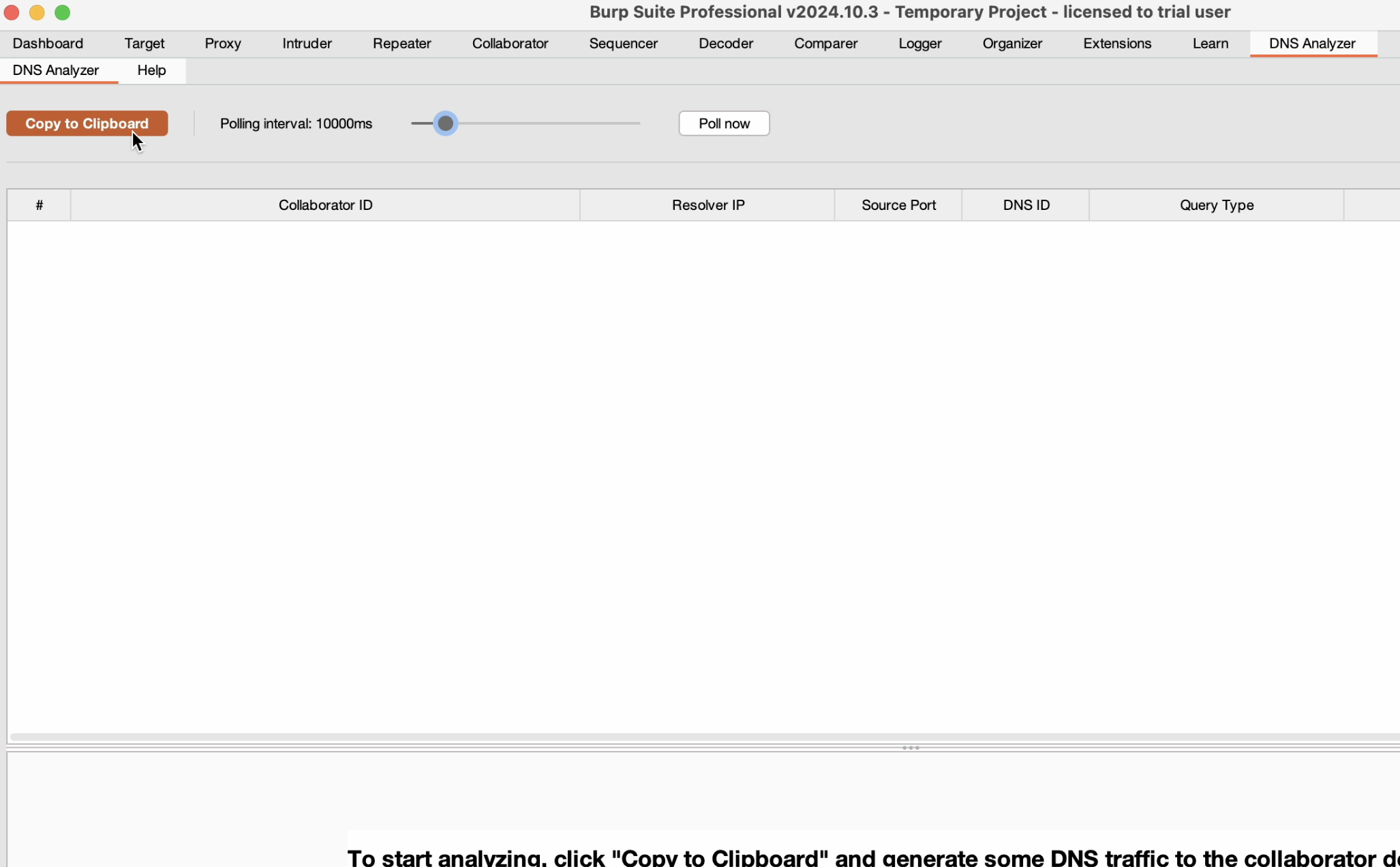
Generating a Collaborator Domain [3] - Initiate DNS Resolution:
- Initiate a DNS resolution for the generated domain. For example, register a user with the email address test@[your Collaborator domain] on the target web application.
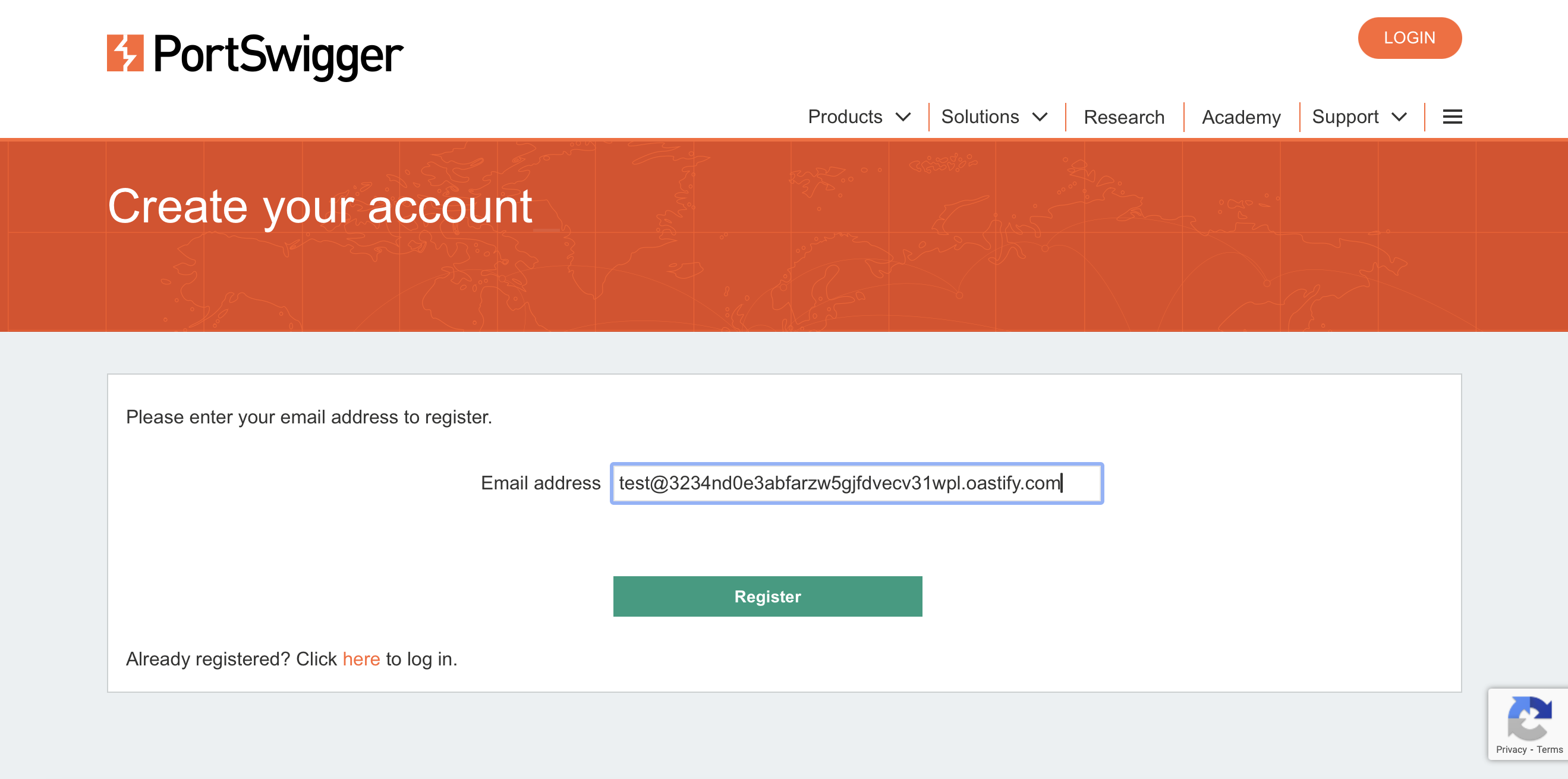
Initiating DNS Resolution [3] - Monitor Interactions:
- The table will continue to fill up as more interactions occur. If necessary, initiate additional DNS resolutions to meet the analysis threshold of 20 interactions.
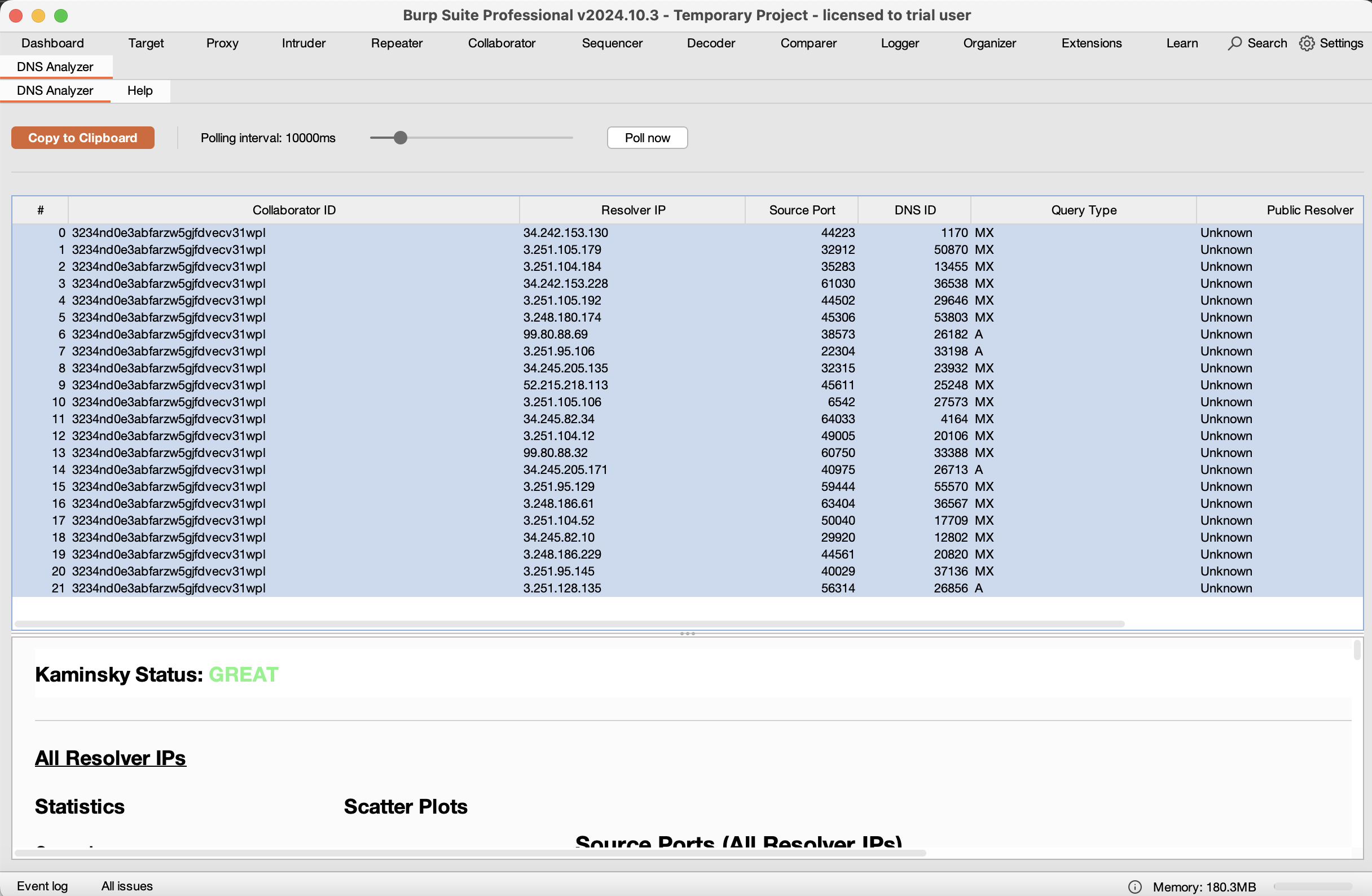
Monitoring Interactions [3] - Review Analysis Results:
- Select a minimum of 20 interactions for analysis. The statistics and graphs will then be available for review in the results pane.
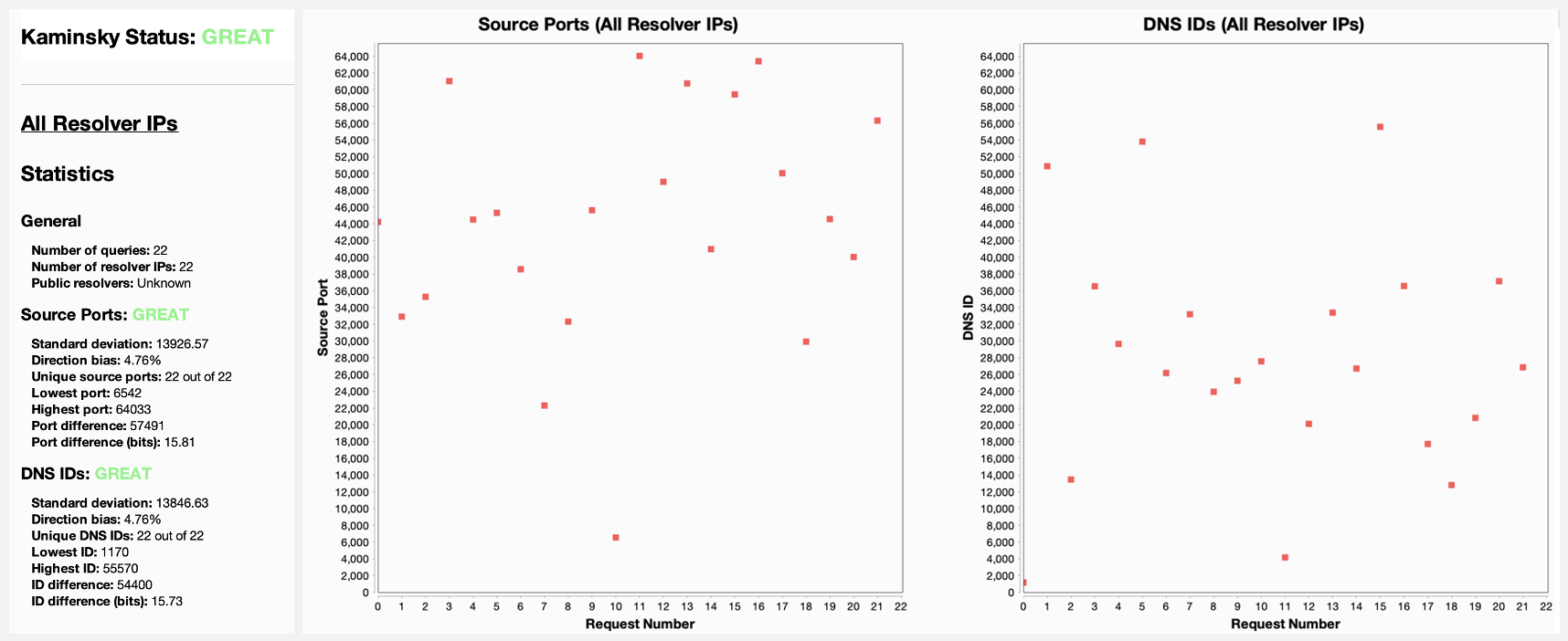
Analysis Results Pane [3]


Analysis and Interpretation
Kaminsky status:
The Kaminsky status is automatically generated by the DNS Analyzer after selecting 20+ interactions, categorizing results as POOR, GOOD, or GREAT based on metrics like:
- Standard deviation: Measures the spread of distribution for source ports and DNS IDs.
- Direction bias: Detects trends (upward or downward) in the distributions.
- Port difference (bits): Compares the range of source ports and DNS IDs.
Scatter plots:
- Visual insights: Scatter plots provide additional insights, enabling identification of patterns that automated analysis might miss.
- Example:
- The UDP source port values show no static distribution, indicating randomness.
- The DNS ID values appear randomly distributed, with no observable clustering or predictability.
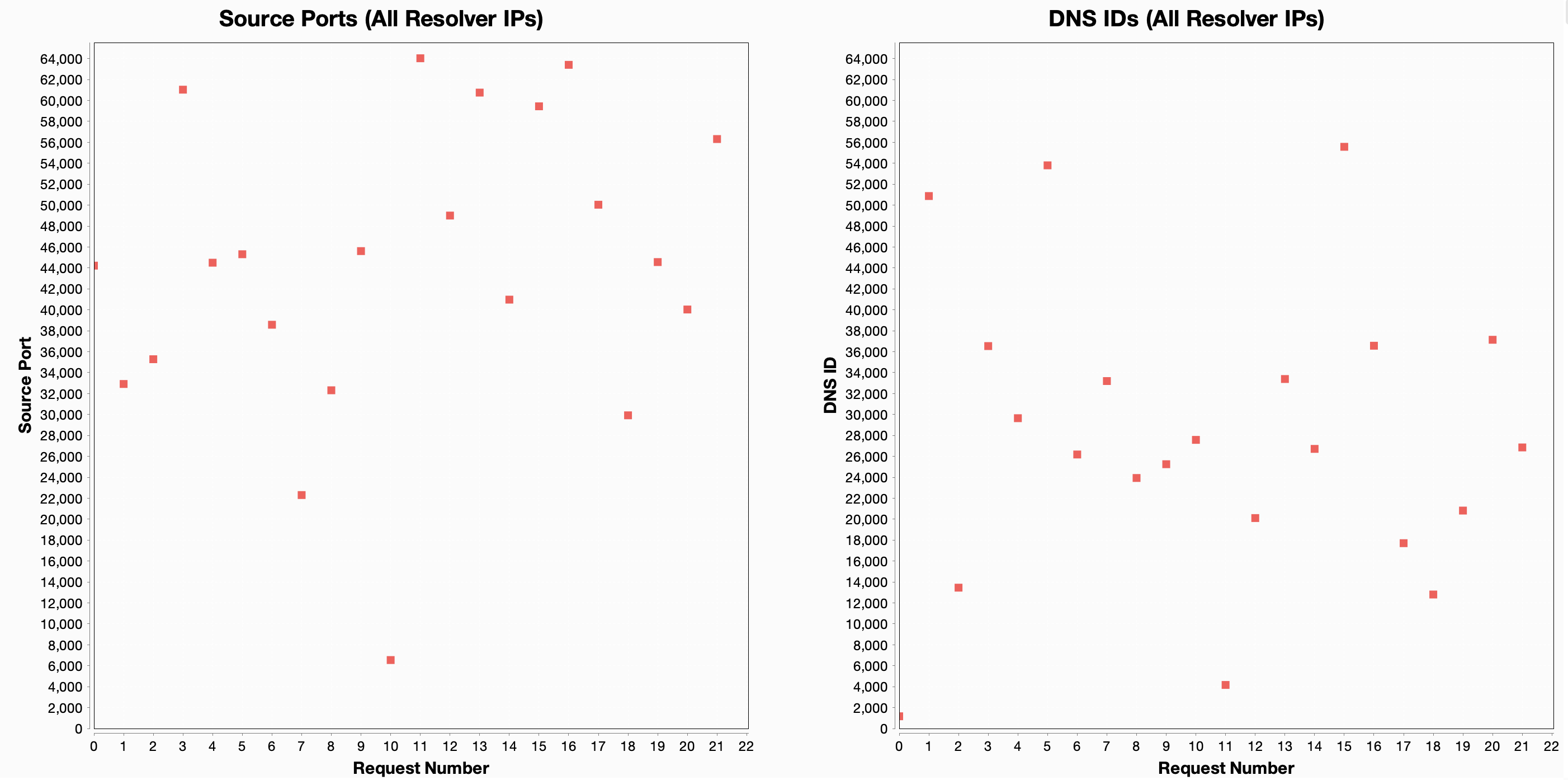
Scatter Plot Analysis [3]

References
- ↑ Dan Kaminsky. (2008). Black ops 2008: It’s the end of the cache as we know it. In Black Hat USA Conference. IOActive, Inc. Presented at Black Hat USA 2008.
- ↑ Gross, Stella. (2024). Representations from (accessed on 11.12.2024, 12:27) and accordingly adapted by the author Gross, Stella.
- ↑ 3.0 3.1 3.2 3.3 3.4 Gross, Stella. (2024). Custom screenshots created for the article and author of this article.
Step-by-Step Guide Reference: https://sec-consult.com/blog/detail/dns-analyzer-finding-dns-vulnerabilities-with-burp-suite/ (accessed on 11.12.2024, 12:27).