HOIC - High Orbit Ion Canon (DoS/DDoS-Tool)
Introduction
The High Orbit Ion Cannon (HOIC) is an open-source tool used for Distributed Denial of Service (DDoS) attacks. A DDoS attack aims to make a server or website inaccessible by overloading it with a large number of requests. HOIC was developed as a successor to the Low Orbit Ion Cannon (LOIC) and is characterized by its high efficiency in HTTP flooding attacks. The tool does not require in-depth technical knowledge and can also be used by inexperienced users.
Important: The use of HOIC for DDoS attacks is illegal in many countries and can have legal consequences.
Functionality and Theory
A DDoS attack using HOIC is based on the principle of HTTP flooding. This involves sending numerous HTTP requests to a target server in order to overload its resources and block legitimate user requests. The intensity and number of requests can be variably set by the software. In addition, so-called booster files can be used to make the attack more difficult to recognize.
Requirements for a HOIC Attack
Required hardware:
- Computer/laptop: A standard PC or laptop is sufficient to use HOIC as it does not have high hardware requirements.
- Internet connection: A stable and fast internet connection is important to send the attack packets effectively.
Required software:
- Operating system: HOIC works on Windows (XP, 7, 8, 10). However, it can also be used on Linux-based systems via Wine (a Windows compatibility layer program).
- HOIC Tool: The HOIC tool itself. It can be downloaded from various sources on the internet, but be careful with the source so as not to download malware. HOIC is available as open-source software.
- Optional:
- Wine (for Linux): Allows Windows programs to run on Linux.
- Virtual Machine: HOIC can be run in a VM so that the host OS is not affected in the event of a malware infection or error. Please keep in mind that a native installation on the Windows host may perform better.
Step-by-Step Guide to Carrying Out a DDoS Attack with HOIC
- Preparation:
- Download HOIC from a trustworthy source. Unfortunately, there is no official source for the tool.
- Unzip the downloaded archive and execute the HOIC.exe file.
- Start HOIC:
- User Interface: Once you have started HOIC, a simple user interface will open with options to configure the attack.
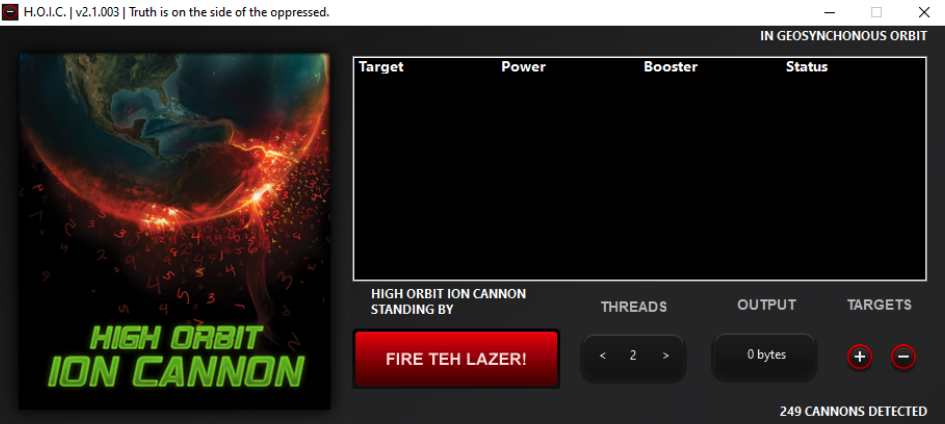
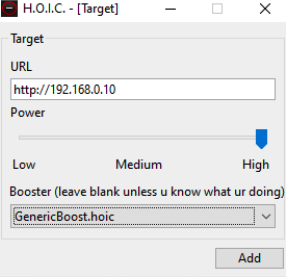
- Insert Target: Click on "+" under Targets to add a target. A new dialogue window then opens where you can enter the URL of the target server. Start with "http://" followed by the IP or domain name of the web server you want to attack. Under Power, you can use the slider to select the intensity of the attack (e.g., High). With the Booster, you can select booster files that strengthen the attack. By default, you can leave this blank; a good choice would be GenericBoost.hoic. You can add multiple targets at the same time (up to 256 targets).
- Select attack method: HOIC offers only one attack method, HTTP flooding
- User Interface: Once you have started HOIC, a simple user interface will open with options to configure the attack.
- Set Attack Parameters:
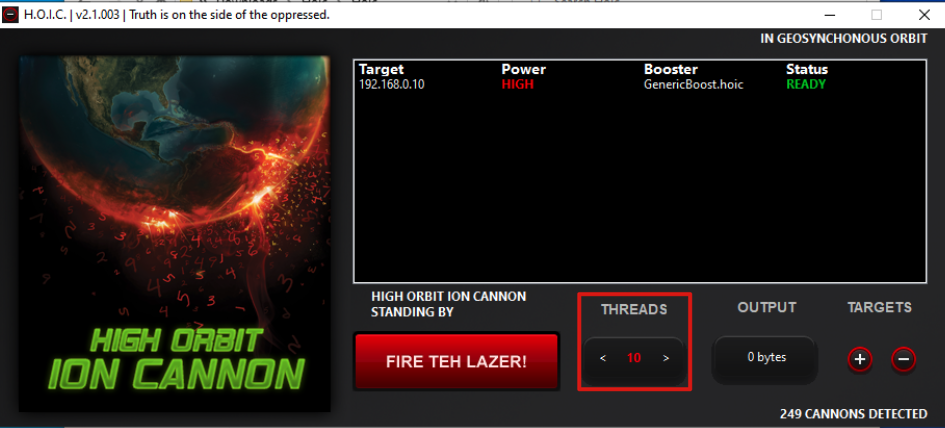
- Number of attacks per second (threads): Set how many requests per second should be sent to the target. The higher the number, the stronger the attack, as increasing the number of threads used increases the number of attacks per second.
- Important to note: Start with a lower number of threads at the beginning and then increase slowly and not directly with 100 threads, as this can often lead to a programme crash.
- Add booster files (optional)
- Boosters: These are small scripts that make the attack more efficient and harder to detect. Booster files modify the HTTP requests and hide the patterns of the attacks. These files can also be downloaded and added to the tool.
- Start attack
- Launch attack: Click on ‘Fire Teh Lazer!’ (the launch button) to start the DDoS attack. HOIC will now send large amounts of HTTP requests to the target.
- Monitor attack: You can monitor the sent packets, threads, and targets during the attack.
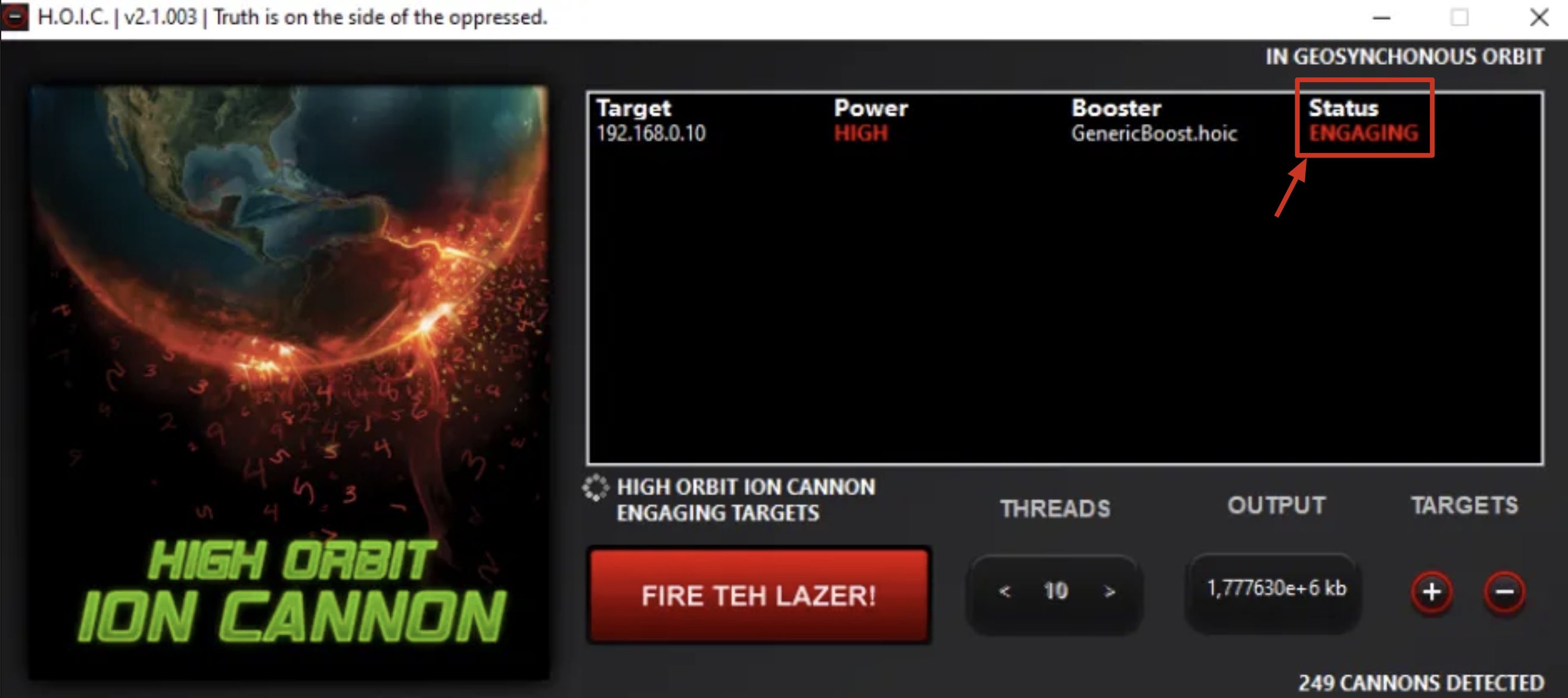
- Now you can see that the status has changed to Engaging, which means that the attack is currently active. At the OUTPUT below, you can see the number of packets sent, which is constantly counting up during the active attack.
- End attack
- If you want to stop the attack, click on ‘Fire Teh Lazer!’ again. It is recommended that you do not leave the attack running for too long, as it can place a heavy load on the bandwidth of your own system and network.
- Responsible behaviour
- Important note: DDoS attacks are illegal in many countries and can result in criminal prosecution. Only use HOIC for testing purposes or in a controlled environment where you have permission to attack the target.


Test of a HOIC attack on an NGINX web server
To demonstrate the effects of a DDoS attack with HOIC, an NGINX web server was set up on an Ubuntu server for test purposes. A HOIC attack was then launched on this machine. The following image shows the TCP dump and the NGINX access logs, which document the incoming data traffic during the attack.
- TCP dump: Here you can see how a large number of TCP packets, especially HTTP requests, are received on port 80 of the web server. This clearly shows how HOIC generates a flood of requests in a short time, which overloads the server.
- NGINX Access Logs: These log every incoming request to the server. As can be seen, the HTTP GET requests arrive in very short succession, which simulates the overloading of the web server. This type of attack often results in the server no longer being able to process legitimate requests.
This test illustrates how a server can be quickly overloaded by a DDoS attack with HOIC by bombarding it with an excessive number of requests.

In this test, only a single web server was attacked to demonstrate the effects of the HOIC tool. In a real-world scenario, however, a DDoS attack is often carried out by hundreds or even thousands of machines simultaneously. Hacking groups configure the tool on many machines and launch the attack simultaneously on the target, for example a website or server. The enormous number of simultaneous requests results in the target's resources being fully utilized so that it can no longer respond to legitimate user requests or loses packets. The more attackers involved, the more serious the impact on the target system.
Effect of booster files on the HTTP header
A decisive difference between an attack with and without booster files can be clearly seen in the HTTP headers of the requests that are recorded in the server's access log. Here in the picture you can see the requests without the use of a booster file. These requests do not contain any details about the user agent, browser or operating system, which are normally specified in the HTTP header. Such requests look very generic and are easy to recognize as part of an attack.

With a booster file, however, as you can see in the images below, the HTTP header is changed dynamically. The booster file adds various information, such as the name of the browser (e.g. Firefox, Opera), the operating system used (Windows, MacOS) and other details that resemble legitimate user requests. This makes it more difficult to detect the attack, as the requests look more realistic and appear to come from different devices. However, the IP address is not changed and is always the same.


- Without booster file: The HTTP header is empty or incomplete, which makes the attack easily recognizable.
- With booster file: The HTTP header contains complete and dynamically changing information, such as browser and operating system, which makes the traffic appear more legitimate. The aim is to disguise the requests so that they are harder to identify as malicious.
Warning: Using HOIC for illegal DDoS attacks can lead to criminal prosecution. Use the tool only for testing and learning purposes in a controlled isolated environment.